









































Most 3D printing hobbyists begin with rigid materials like PLA, PETG, or ABS. These plastics are strong and reliable, but they cannot bend or absorb impact without cracking.

Flexible 3D printer filament introduces elasticity into the process. With the TPU filament, the 3D printed part is able to stretch or compress, yet revert to its normal shape after the stretching or compressing force is removed. This feature makes them suitable for applications like gaskets, phone cases, and wearable components.
What Is Flexible 3D Printer Filament?
Flexible filament is a category of 3D printing materials known as Thermoplastic Elastomers (TPE). Flexible filaments are unlike other plastics, whereby their composition is mainly hard plastic and rubber combined. This composition enables it to perform like other plastics when heated, then cool and turn out like rubber.
As flexible" is a vague term, manufacturers use the Shore Hardness scales (usually Scale A or Scale D) to define exactly how squishy a material is. The lower the number, the softer the material.
-
Shore 85A: Very soft, similar to a shoe heel or a rubber band. These are difficult to print because they are so floppy.
-
Shore 95A: Semi-flexible, similar to a shopping cart wheel or an automotive tire. This is the most common flexibility level for 3D printing because it offers a balance of flexibility and printability.
-
Shore 60D: Semi-rigid, similar to a hard hat. These can bend slightly but are very tough.
Types of Flexible 3D Printer Filament
You may wonder what 3d printer filaments are flexible? No worries, while there are many chemical variations, beginners will generally encounter three main types:
TPU (Thermoplastic Polyurethane) – The most widely used flexible filament. It is prized for its high resistance to abrasion (wear and tear), oils, and greases. TPU is generally stiffer than other flexible materials (usually around 95A Shore Hardness), which makes it easier to push through a 3D printer’s extruder.
TPE (Thermoplastic Elastomer) – While TPU is technically a type of TPE, in the 3D printing world, "TPE" is often used as a label for softer, more rubber-like filaments (often in the 85A range or lower). These offer superior elasticity but are significantly harder to print due to their softness.
TPC (Thermoplastic Copolyester) – This is an industrial-grade flexible material (around Shore 85A–100A hardness). TPC boasts high resistance to high temperatures, UV light, and chemicals. It is less common in hobbyist printing but essential for engineering applications involving outdoor exposure.
Soft PLA (Flexible PLA) – A flexible variant of regular PLA. Soft PLA is more bendable than ordinary PLA but not as stretchy as TPU. It is easier to print (less jamming and strings) and is a lightweight ‘rubber-like’ plastic.
Why Choose Flexible 3D Printer Filament
Switching from rigid to flexible materials is not just changing another spool of filament. It is about changing the functional properties of your prints.
Best Applications for Flexible Filament
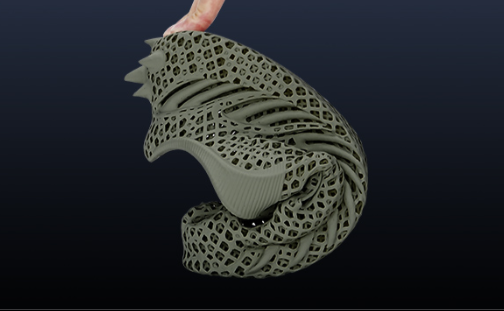
Because of its unique properties, flexible filament is mostly used in prints needing rubbery or shock-absorbing parts:
-
Vibration Dampening: You can print custom feet for your printer, furniture, or heavy machinery to absorb shock and reduce noise.
-
Protective Gear: Custom phone cases, drone bumpers, and tool handle grips take advantage of the material's ability to absorb impact energy without cracking.
-
Seals and Gaskets: If you need a custom O-ring for a watertight container or a dust seal for a vacuum cleaner, flexible filament can create an airtight barrier.
-
Wearables: From cosplay armor straps to watch bands and shoe insoles, the material is comfortable against the skin and moves with the body.
Pros and Cons
Before loading a spool of flexible filament, it is important to weigh the benefits against the operational difficulties.
| Pros | Explanation | Cons | Explanation |
| High Impact Resistance | Parts bend and absorb energy instead of cracking or snapping. | More Difficult to Print | Soft filament can jam, buckle, or wrap around extruder gears. |
| Strong Layer Adhesion | Layers fuse well, reducing delamination and improving watertight performance. | Increased Stringing | Elastic material continues oozing during travel moves, creating fine strings. |
| Excellent Abrasion Resistance | TPU and similar materials resist wear, scratching, and friction. | Limited Post-Processing | Sanding and surface finishing are difficult due to the material’s flexibility. |
Best Printer Settings for Flexible 3D Printer Filament
For an optimal outcome with flexible materials, you need to adjust several parameters:
Hardware Requirements (Direct Drive vs. Bowden)
Your printer’s extruder setup greatly affects how easily you can print flexible filament.
Direct drive extruders have the motor mounted directly over the hotend. This shortens the distance the filament must travel, preventing bending or buckling, and makes it ideal for flexible materials.
Bowden extruders push filament through a longer PTFE tube before it reaches the nozzle. The extended path increases the risk of the filament compressing or jamming. While printing flexible filament on a Bowden system is possible, it typically requires very slow speeds and works best with harder materials, such as Shore 95A TPU.
Critical Settings (Speed, Retraction, Cooling)
If you are accustomed to printing PLA, you will need to drastically change your profile settings.
Print Speed
Flexible filament prints best at low speeds.
Recommended: 15–30 mm/s.
Printing too fast increases back pressure in the nozzle, which can cause the filament to compress and buckle in the extruder.
Retraction
Retraction pulls filament backward during travel moves to reduce stringing.
Recommended: Disable retraction or keep it minimal (0.5–1.0 mm at low speed).
Frequent retraction can stretch soft filament and lead to under-extrusion or jams.
Cooling Fans
Moderate cooling helps maintain print shape, especially for bridges and overhangs.
Recommended: 30–60% fan speed after the first few layers.
Excessive cooling may reduce layer adhesion and flexibility.
Layer Height
Slightly thicker layers often improve reliability.
Recommended: 0.2–0.24 mm.
Thicker layers allow smoother material flow compared to very fine layers such as 0.1 mm.
The Moisture Problem
This is the single most common reason for failure, yet it is often overlooked. Flexible filaments are hygroscopic, meaning they absorb moisture from the air very aggressively.
If your filament is "wet" (even if it doesn't look wet), the water trapped inside turns to steam when it hits the hot nozzle. This results in:
-
A popping or crackling sound during printing.
-
Bubbles or fuzzy textures on the surface of the print.
-
Ideally, weak layer adhesion.
Solution: You must know how to properly store filament and dry flexible filament before printing. Using a dedicated filament dryer or a modified food dehydrator is highly recommended. Storing the filament in a dry box with silica gel desiccant is mandatory when not in use.
FAQs
Q: What temperatures should I use for TPU/TPU filaments?
It varies by brand, but a good starting point is about 220°C for the nozzle and 40–60°C for the bed.
Q: Is TPU the only flexible filament? No. TPU is the most common, but other flexible filaments include TPE, TPC, and soft PLA, each with different flexibility and hardness levels.
Q: Is TPU harder to print than PLA? Yes. TPU is softer and stretchier, which can cause filament jams and stringing. Printing requires slower speeds, minimal retraction, and careful extrusion.
In Summary
While the learning curve can be steep—requiring patience for slow print speeds and careful moisture management—flexible 3D printer filament like TPU allows you to create parts that flex and absorb impact. It lets makers go beyond decorative models to produce functional, real-world components.