










































The world of 3D printing has come a long way, with numerous improvements that make creating models easier and more exciting. Arguably, one of the greatest advancements is the creation of the 3MF file. Offering a better way to store digital models, it’s a game-changer, with better accuracy, smaller file sizes, and multi-object, multi-project printing capabilities. 3MF is a compressed, XML-based file format (.3mf) created by an industry-backed initiative to provide a modern, comprehensive standard that puts 3D manufacturing data in one place. 3MF files store the complete model data,including slicer settings, color, materials, and geometry, as opposed to STL files that only store surface geometry. So, what is a 3MF file, and why is it so beneficial for 3D printing? We’ll discuss these questions and more in the following article.
What Does 3MF Stand For?
3MF stands for 3D manufacturing format. In the past, STL files were used to define 3D surface geometry, using a mesh of triangles, but they often failed because they didn’t properly convey holes, open edges, and inside-out surfaces. So, in 2015, a consortium of companies came together to create a new file format that replaced the outdated one. It addressed STL limitations and offered improved efficiency, thanks to smaller files that were easier to transmit. Since 3MF is open-sourced, it makes communication with different hardware and software seamless. 3MF made 3D printing more accessible, helping grow the industry and improve user experience.
Why Was the 3MF File Format Created?
As we mentioned earlier, 3MF files for 3D printing transformed how creatives used 3D printing technology. It addressed problems that commonly occurred during real printing workflows due to STL limitations. These issues included:
-
No unit information
-
No color data
-
No material properties
-
No print settings
How does 3MF solve these issues?
-
Stores complete project data
-
Includes print settings
-
Improves repeatability
-
Supports industrial production workflows
3MF solves many of the problems that made 3D printing frustrating and unreliable. The result is a more streamlined and enjoyable experience for users of all experience levels.

3MF Files for 3D Printing: How They Work
3MF files for 3D printing are generated by slicing software to create a full project with supports, scales, and orientation. They’re made by bundling 3D model geometry, typically from OBJ/STL, with specific object modifications, material properties, printer configurations, and print settings. 3MF files contain:
-
Geometry data
-
Units and scale
-
Colors and textures
-
Material properties
-
Print settings
-
Support structures
How do all of these features combine to make 3MF improve print success rates?
Reducing Errors for Better Geometry
3MF's volumetric representation eliminates self-intersections and on-manifold edges that are common in STL files.
Embedding Slicer Settings
The entire scene, including modifiers, support structures, orientation, and printer profile, is saved, reducing preparation mistakes.
Smaller File Size
Since 3MF files are generally smaller than traditional STL files, they’re less prone to data corruption and faster to process.
Improved Accuracy
Advanced features like multiple materials, textures, and colors in one file.
Having the capacity for multi-material printing lets you create functional, single-part assemblies that combine flexible and rigid materials, eliminating or reducing post-processing assembly. The benefits include:
-
Improved design customization
-
Enhanced performance using custom material properties
-
Ability to dissolve supports for intricate geometries
-
Faster product development
-
Enhanced aesthetics and customization
-
Create complex geometries even with soluble solutions
-
Optimal cost savings and material usage
-
Improved structure integrity
-
Reduced post-processing and assembly time
-
Integrated functionality with rigid and soft combinations
3MF opens the door to complex print creations with greater flexibility and higher success rates than ever before.
What is G-code File Extension? Is It The Same as 3MF?
If you’re looking to store multiple 3MF files, you can do so with a G-code file extension. What is a G-code file extension 3MF? It’s a hybrid file that places raw G-code or machine instructions inside a 3MF file. It combines print settings, a thumbnail preview, and pre-sliced toolpaths, creating a project file that 3D printers can execute from directly. What is the purpose of a G-code? It lets users save ready-to-print projects that are fully sliced, with all color information and settings, instead of just storing the 3D model geometry. A common question is whether a G-code file extension is the same as 3MF, and the short answer is no. A standard 3MF contains 3D geometry that must be sliced later. A G-code.3mf doesn’t have the raw 3D object, just the calculated toolpath to create it.
3MF vs G-Code: What’s the Difference?
|
3MF
|
G-code
|
|
Design + print configuration file
|
Machine execution file
|
|
Editable
|
Typically not editable
|
|
Used in preparation stage
|
Used in printing stage
|
How to Open 3MF Files
Knowing how to open 3MF files is essential to using them, but if you’re new to 3D printing you may not know where to start. There’s three main ways to open and view these files: with 3D printing slicers, on desktop viewers, and through online viewers.
3D Printing Software That Supports 3MF
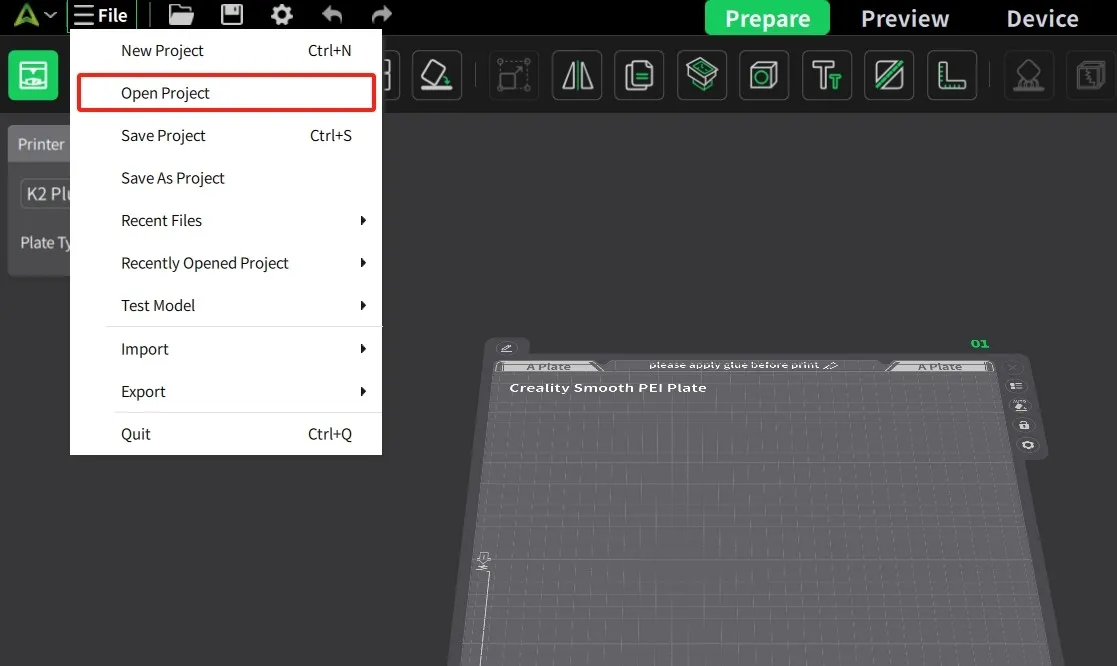
The easiest and most reliable way to open 3MF files is with printing software like Creality Print. It works by utilizing a ZIP-based, open-source package, storing comprehensive project data in a secure file. In Creality Print, simply open the file menu and select “Open Project” to locate the correct 3MF file. On other slicers like Bambu Studio, Cura, or PrusaSlicer, go to “File” >”Open”>and select a 3MF file. With desktop and online viewers, drag and drop the 3MF file into the browser window.
Can You Open 3MF Files Without a 3D Printer?
Since a 3MF file is technically a compressed archive containing structured XML data, it is compatible with modeling or slicing software. However, you can’t open it on a standard image viewer.
Advantages and Disadvantages of the 3MF File Format
As with all types of 3D printing formatting, there are advantages and disadvantages of the 3MF file format. However, as you’ll see, the positives far outweigh the negatives, which is why it’s such a popular choice for creatives.
Advantages:
-
Saves full print configuration
-
Smaller and more efficient file structure
-
Better compatibility with modern slicers
-
Supports complex, multi-material models
Disadvantages:
-
Limited compatibility with older software
-
Cannot be printed directly (requires slicing)
When Should You Use 3MF Instead of STL?
As you now know, 3MF is a compressed yet comprehensive container for storing metadata, materials, and geometry, while STL only stores geometry. 3MF significantly reduces errors compared to the more outdated file, but does that mean you should never use an STL file? Let’s go over the best times to choose 3MF instead of STL.
-
For multi-material printing
-
When sharing complete project files
-
For repeat production and consistent results
-
With industrial workflows
-
In collaborative team environments
On any project where accuracy and success matter, 3MF is the way to go!
The Future of the 3MF File Format in 3D Printing
With all of its benefits, it raises the question: Will 3MF replace STL? In short, yes. While STL is still a great choice for single-material, simple designs and hobbyist prints, it's quickly becoming outdated. In fact, 3MF is actively replacing STL as the modern, standard 3D printing file format. This skyrocketed growth is due in part to widespread industry adoption and integration with cloud-based printing and remote manufacturing. There’s no doubt that 3MF is the future of 3D printing file formatting, and it promises to push the limits of what we once thought possible.
Creality is the leader in innovative desktop 3D printers, bringing 3D printers to countless sectors from architecture and healthcare to education and manufacturing. Creality brings the thrill of 3D printing to life for all creatives, from hobbyists to makers and beyond.
FAQ
What is a 3MF file used for?
A 3MF file is used to store complete 3D model information, including print settings, color, materials, and geometry, on a single, compact file.
Is 3MF better than STL?
Thanks to its smaller size, higher efficiency, improved accuracy, and multi-material support capabilities, 3MF is considerably better than STL.
Can I convert 3MF to G-Code?
Yes, by loading 3MF files into slicing software, you can convert them to G-Code.
Why does my 3MF file not open?
There’s a few reasons why your 3MF file may not open, including:
-
A glitch in your slicer software
-
Trying to open a “project” file as a 3D model
-
The file is corrupted
-
Version incompatibility
Is 3MF compatible with all 3D printers?
No 3MF files aren’t compatible with all 3D printers, specifically obscure or very old models. However, 3MF is supported by modern, major 3D printer software and manufacturer providers like Creality.