Welcome to Creality  SPARKX i7 Buy Now 🔥

Creality
Store
  • 3D Printers
  • Ecosystem
  • Support
  • Software
  • Blog
  • Creality Cloud
  • M1 & R1
  • United States (English)
Cancel

Quick Links

    Creality
    3D PrintersEcosystem SupportSoftwareBlogCreality CloudM1 & R1
    Store
    SPARKXFlagshipHi SeriesEnder SeriesHALOT Series
    SPARKX i7
    New
    SPARKX i7
    More Products
    Compare
    K2 SE
    New
    K2 SE
    K2
    New
    K2
    K2 Pro
    K2 Pro
    K2 Plus
    K2 Plus
    K1 Max
    K1 Max
    More Products
    Compare
    Creality Hi
    Creality Hi
    More Products
    Compare
    Ender-3 V4
    New
    Ender-3 V4
    Ender-5 Max
    Ender-5 Max
    Ender-3 V3 Plus
    Ender-3 V3 Plus
    Ender-3 V3
    Ender-3 V3
    Ender-3 V3 SE
    Ender-3 V3 SE
    More Products
    Compare
    HALOT-X1
    New
    HALOT-X1
    HALOT R6
    HALOT R6
    HALOT-MAGE S
    HALOT-MAGE S
    HALOT-MAGE
    HALOT-MAGE
    More Products
    Compare
    Filaments3D ScannersLaser EngraversAccessories
    Hyper Series
    Hyper Series
    CR Series
    CR Series
    Soleyin Series
    Soleyin Series
    Ender Series
    Ender Series
    More Products
    Compare
    Sermoon P1
    New
    Sermoon P1
    Sermoon X1
    Sermoon X1
    Sermoon S1
    Sermoon S1
    Creality Raptor Pro
    Creality Raptor Pro
    Otter Lite/Basic
    Otter Lite/Basic
    More Products
    Compare
    Creality Falcon A1 Pro 20W
    New
    Creality Falcon A1 Pro 20W
    Creality Falcon A1
    Creality Falcon A1
    Creality Falcon2 Pro 60W
    Creality Falcon2 Pro 60W
    Creality Falcon2 Pro
    Creality Falcon2 Pro
    Creality Falcon2 22W
    Creality Falcon2 22W
    More Products
    Compare
    CFS-C
    New
    CFS-C
    SpacePi X4L
    New
    SpacePi X4L
    Creality SpacePi X4
    Creality SpacePi X4
    Creality Space Pi  Dryer
    Creality Space Pi Dryer
    CFS - Creality Filament System
    CFS - Creality Filament System
    More Products
    Compare
    Download Center
    3D Models
    Creality Cloud App
    Firmware & Software
    Service Center
    Help Center
    Creality Wiki
    Product Support
    Video Guides
    Product Comparison
    Filament Guide
    Find Your Printer
    Discover
    User Stories
    3D Printing in Education
    Blog Center / SPARKX i7 Intelligent Status Light Meanings & Usage Guide
    Contents
    contents

    Join Our Newsletter

    Subscribe to our newsletter for 3D printing insights, step-by-step guides, and inspirations for your next 3D printing adventure.

    By subscribing, you agree to our Terms and Privacy Policy.

    Social Media

    • Youtube
    • Facebook
    • Instagram
    • TikTok
    • Twitter
    • Reddit
    • Discord
    • LinkedIn

    Contents

    • Status Indicator Light Meanings
    • Multi-Color Ambient Light Guide

    SPARKX i7 Intelligent Status Light Meanings & Usage Guide

    May 8, 2026 13:47:17

    The SPARKX i7 features a multi-color intelligent status light located at the lower front of the printer. During printing, it displays the current print status in real time, including the task stage, printing progress, and error alerts, allowing you to quickly understand the printer’s current state. It can also be used as ambient lighting, with multiple lighting effects available to choose from.

    Status Indicator Light Meanings

    Power On

    Light Effect: White breathing light

    Description: The printer is powering on and entering the system. The white breathing light pulses until the startup process is complete.
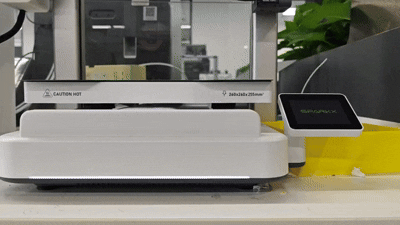
    Status Indicator Light

    Printer Self-Test / Calibration in Progress

    Light Effect: Rainbow flowing

    Description: The printer is performing a self-test or calibration. The rainbow flowing light remains active until the process is completed.
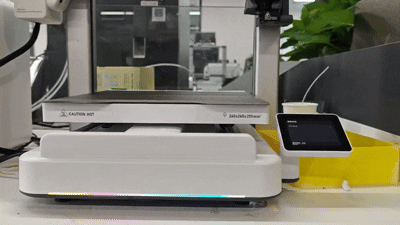
    Printer Self-Test  Calibration

    Printer Idle

    Light Effect: Soft white steady light, lights off (screen-off state), or custom ambient lighting

    Description: The printer currently has no active tasks. You can enable Always On Mode in Settings → Print Settings → Status Light to keep the status light illuminated even when the screen is off.
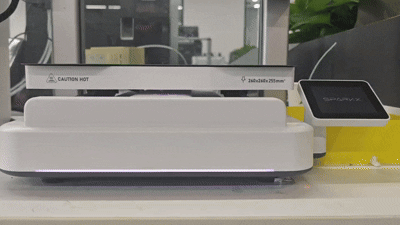
    Printer Idle

    Printer Preparing

    Light Effect: Cyan breathing light

    Description: The printer is in the pre-print preparation stage. The cyan breathing light pulses slowly until preparation is complete and printing begins.

    Printing in Progress

    Light Effect: White indicator light displaying a progress bar, or custom ambient lighting

    Description: The printer is actively printing a model, with the light indicating the printing progress in real time.
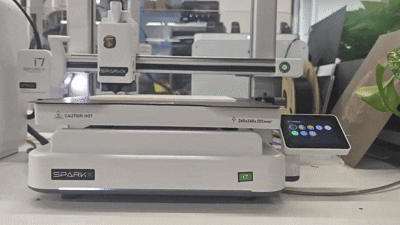
    Printing in Progress

    Print Paused

    Light Effect: Orange breathing light

    Description: The print job is paused. The orange breathing light pulses until you resume or stop the print.
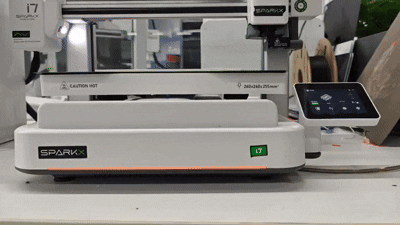
    Print Paused

    Print Resuming / Retrying / Stopping

    Light Effect: Cyan breathing light

    Description: The printer is resuming or retrying a print after a pause or error, or is in the process of stopping the current print job.
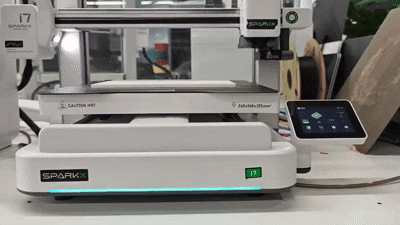
    Print Resuming  Retrying  Stopping

    Print Completed

    Light Effect: Cyan breathing light

    Description: The print job has finished. The status indicator light pulses cyan until the user dismisses the “Print Completed” notification on the screen.

    Error / Fault

    Light Effect: Rapidly flashing red light

    Description: An error occurred during printing. The indicator light flashes red rapidly until the user dismisses the error notification on the screen.

    Factory Reset

    Light Effect: White-to-blue gradient cycling

    Description: The printer is performing the factory reset process.

    Firmware Updating

    Light Effect: Rainbow flowing

    Description: The printer is performing a firmware update. The full-color gradient flowing light remains active until the update is complete and the printer restarts.

    Multi-Color Ambient Light Guide

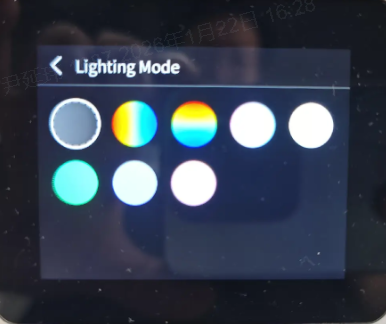
    The SPARKX i7 comes with a variety of built-in ambient lighting effects for you to choose from. You can select your preferred lighting effect. Custom ambient light effects are only active when the printer is idle or printing.

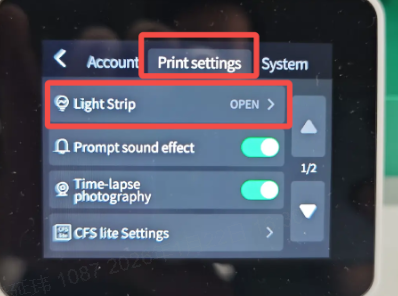
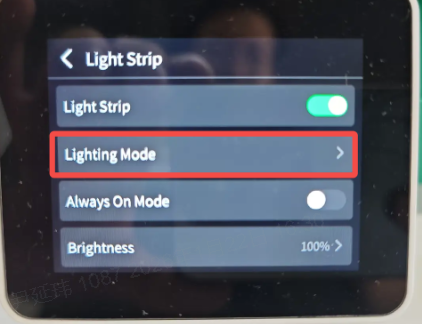
    Ambient Light Settings: Settings → Print Settings → Status Light → Light Effect Style
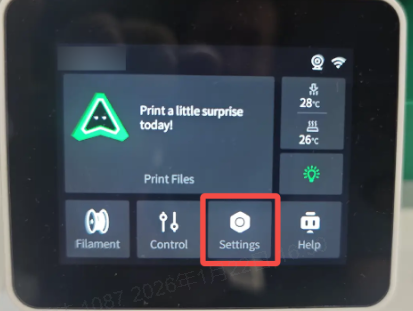
    Ambient Light Settings
    Ambient Light print Settings
    Status Light
    Light Effect Style

    More ambient light effects are continuously being added—stay tuned!

    SHOP

    • Store
    • Falcon Store
    • K Series
    • Hi Series
    • Ender Series

    COMMUNITY

    • Forum
    • Creality Cloud
    • Discord
    • Reddit
    • Open Source

    SUPPORT

    • Downloads
    • Help Center
    • Video Guides
    • Warranty & Repairs
    • Creality Wiki

    ABOUT

    • About Us
    • Distributors
    • ShareFest Events

    Be the First to Know

    Get the latest news from Creality.

    • Youtube
    • Facebook
    • Instagram
    • TikTok
    • Twitter
    • Reddit
    • Discord
    • LinkedIn
    Privacy PolicyTerms of SalesShipping PolicyFeedback
    United States(English)

    Copyright © 2025 Creality Co., Ltd. All rights reserved.