









































3D scanning is often associated with reverse engineering, industrial inspection, automotive modification, and digital modeling. Yet in fields such as orthotics and prosthetics, rehabilitation support, and adaptive sports equipment, 3D scanning is becoming an equally powerful tool for solving highly personal and complex human-centered challenges.
Unlike standard consumer products, assistive devices often need to be designed around one specific person. Body conditions, range of motion, remaining muscle control, comfort requirements, and functional goals can vary dramatically from one user to another. In these scenarios, the challenge is not simply to create a device that “works,” but to create a device that fits, supports, performs reliably, and allows the user to regain independence.
A recent project shared by @Андрей Гашников demonstrates this value clearly. As part of a volunteer initiative, he helped create customized trigger adapters for two veteran archers who could not release arrows independently due to severe physical disabilities. By combining hand-shaped prototypes, Sermoon P1 3D scanner, digital modeling, metal fabrication, 3D printing, and real-world testing, the team developed individualized assistive devices that allowed both athletes to shoot without external assistance.
This case is more than a product application. It is a complete example of how 3D scanning can connect real physical needs with digital design and personalized manufacturing.
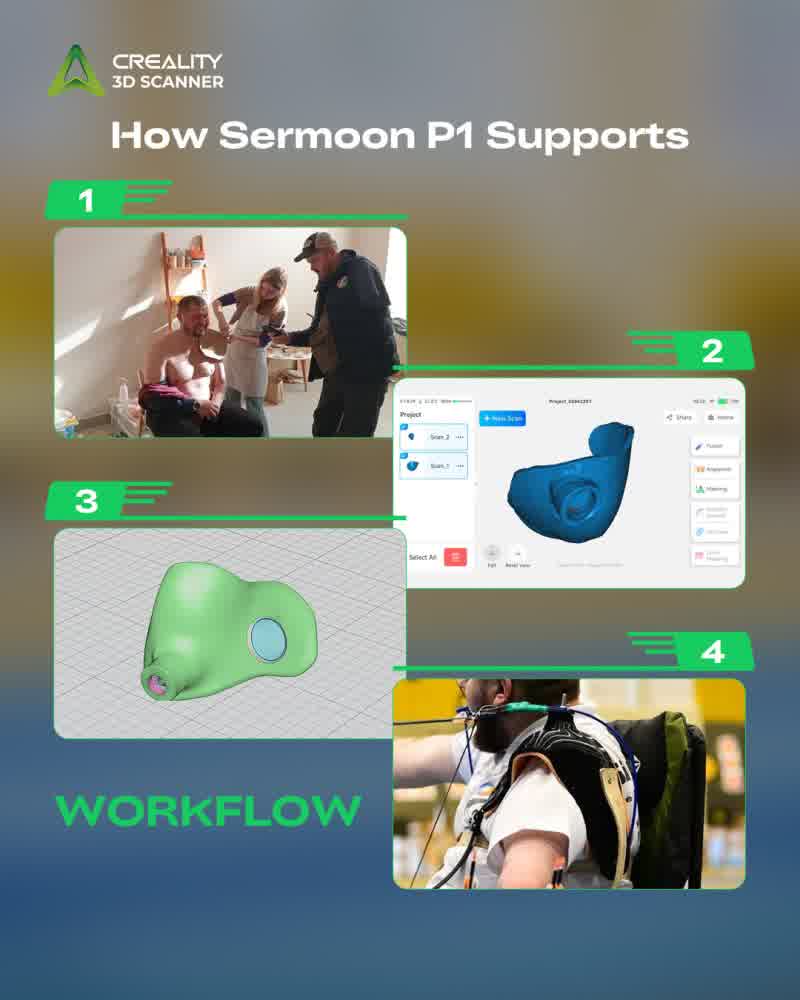
Digital Workflow: From Clay Prototype to Functional Assistive Device
The project followed a practical digital manufacturing workflow. Instead of relying only on manual shaping or trial-and-error, the team used 3D scanning as the bridge between physical fitting and digital design.
-
Understanding the user’s physical condition and shooting needs
The team first analyzed the archers’ physical limitations, how they interacted with the bow, and why the existing assisted trigger method was not suitable for training or competition. The goal was clearly defined: each archer needed a customized solution that would allow independent trigger activation.
-
Testing the initial leather adapter concept
Before moving into digital design, a thick leather adapter was tested. However, the material was too soft and flexible. It could not provide the rigid and stable control needed for accurate trigger release. This early failure helped clarify the design direction: the final solution needed stronger structure, better fit, and more precise control.
-
Creating individual clay trigger adapter prototypes
To explore the correct shape and fit, the team worked with a clay master to create draft trigger adapters. Two individual clay adapters were made, each shaped around the needs of one archer. This step allowed the team to quickly explore body fit, contact areas, and basic functional positioning.
-
Scanning the clay adapters with Sermoon P1
The clay adapters were then scanned with the Sermoon P1. This was a key step in the workflow. The scanner converted the handmade physical prototypes into digital 3D data, preserving the individual shapes created for each archer.
-
Cleaning the scanned surfaces in ZBrush
After scanning, the models were cleaned in ZBrush. This helped refine the surface quality and prepare the scan data for further design work. In assistive device development, clean scan data is important because the model must remain accurate enough for fitting while also being usable in downstream design software.
-
Modeling the mechanical structure in Fusion 360
The team then moved into Fusion 360 to model the bearing holder for trigger rotation and height adjustment. This step transformed the project from a fitted shape into a functional mechanical device. The trigger adapter needed not only to fit the archer, but also to support movement, adjustment, and stable triggering.
-
Designing and laser-cutting the metal trigger holder
A trigger holder was modeled and cut from metal using a laser cutter. This provided additional rigidity for the functional part of the device, solving one of the key problems of the earlier leather version: insufficient stiffness.
-
3D printing the adapter body
The adapter body was then 3D printed. 3D printing allowed the team to quickly produce customized parts based on the scanned and modeled data, making it possible to test real physical versions without long manufacturing cycles.
-
Testing multiple trigger activator designs
The team tested several versions of trigger activators. Early approaches included cheek or cheekbone activation, but these did not deliver the expected comfort and performance. This stage was critical because assistive equipment cannot be validated only on screen. It must be tested with the actual user in the actual motion environment.
-
Developing the final mouth-trigger solution
After multiple tests, the team focused on a mouth-trigger design. They scanned clothespins with Sermoon P1 and used the mechanism as inspiration for the trigger structure. By combining this idea with a boxing mouth guard, they created a practical mouth-trigger solution that allowed the archers to activate the trigger independently.
-
Final fitting and real-world use
The final trigger adapters were made individually and fitted to each archer. According to the project feedback, the adapters fit perfectly, enabled independent trigger release, and improved shooting results and accuracy.
Background and Core Challenges: From Assisted Shooting to Independent Control
The project began with a very specific and difficult challenge: two veteran archers wanted to continue practicing archery, but their physical conditions made independent trigger release impossible.
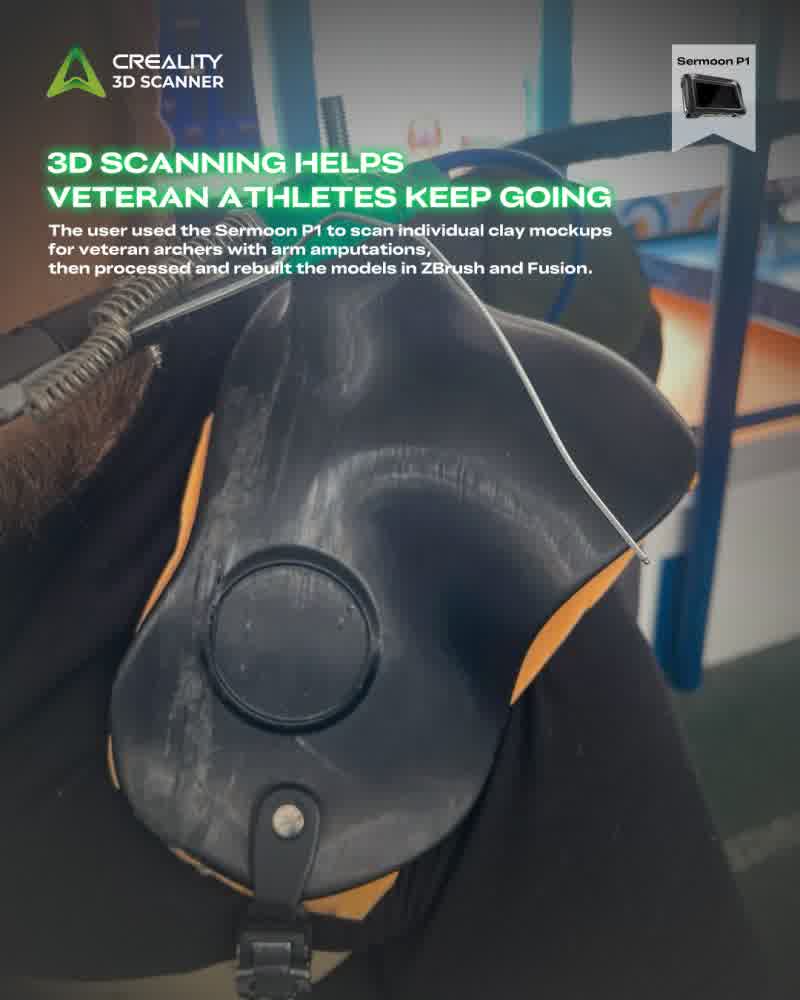
One of the veterans had a fully disabled arm due to damaged nerve endings. The other had an arm amputated up to the shoulder and had also lost both legs. Despite these life-changing injuries, both continued to pursue archery. However, the release mechanism became a major barrier.
In their previous setup, the archer could hold the bow, but an assistant had to push the trigger. While this allowed them to complete the shooting action, it limited their independence and introduced instability into the process. For a sport like archery, where timing, body control, rhythm, and release consistency directly affect performance, depending on another person to activate the trigger is far from ideal.
The first attempted solution was a thick leather adapter. However, the material was too flexible and not rigid enough to provide reliable trigger control. It could not deliver the level of stability, repeatability, and precision required for archery.
This made the project significantly more complex than creating a simple accessory. The team had to design a device that could meet several demanding requirements at once. It had to be individually fitted to each archer, rigid enough to support stable trigger control, comfortable enough for real use, and adaptable enough to support different triggering methods. It also had to work within the athletes’ physical limitations without interfering with posture, aim, or shooting accuracy.
Most importantly, the device had to help the archers move from assisted participation to independent action.
That is where 3D scanning became essential. The team needed a way to transform personalized physical prototypes into editable digital models, refine the mechanical structure, and iterate quickly based on testing feedback.
The Role of Sermoon P1: From Physical Prototype to Digital Iteration
In this project, Sermoon P1 was not just used to capture a shape. It became the starting point of the entire digital workflow.
The team first used Sermoon P1 to scan the customized clay adapters. These clay prototypes were useful for quickly exploring fit and shape, but they could not be easily refined, reproduced, or engineered. By turning them into digital 3D models, the team preserved the personalized form of each adapter and continued the design process in software.
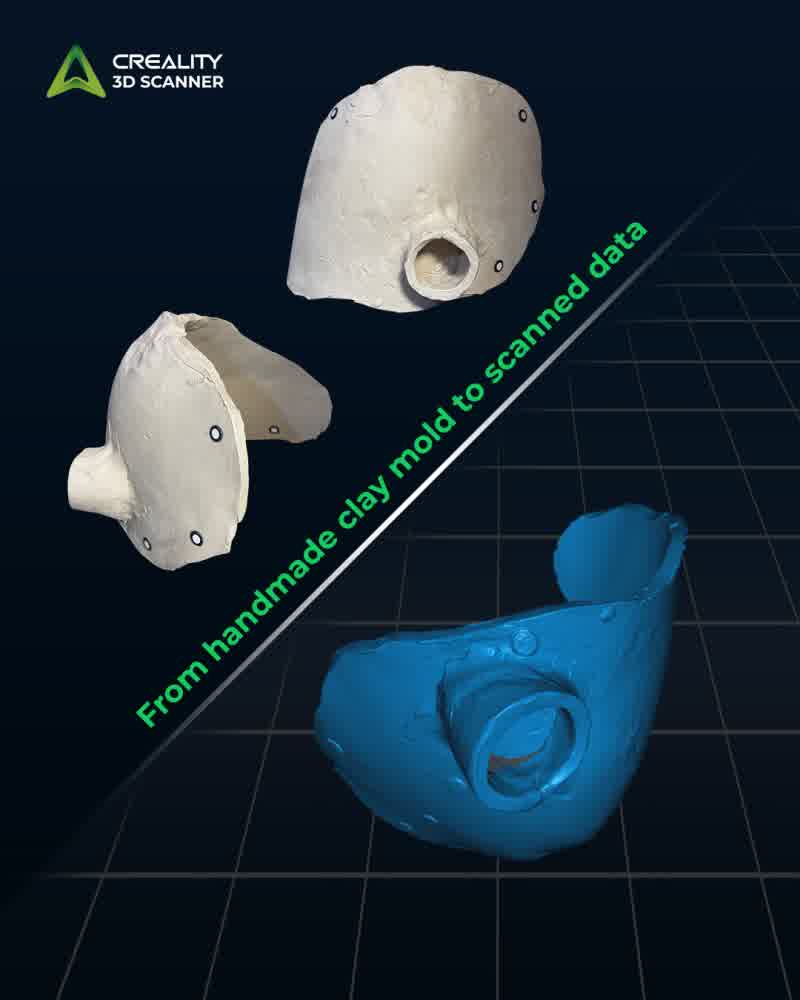
This was especially important because each device had to be made for one specific archer. The scan data helped keep the design grounded in the user’s actual physical needs, rather than relying on generic measurements.
Sermoon P1 also supported iteration. After scanning, the team cleaned the models in ZBrush, built functional structures in Fusion 360, manufactured the parts, tested them, and continued improving the design based on real feedback.
Another highlight was the final mouth-trigger solution. The team scanned clothespins with Sermoon P1 and adapted the mechanism with a boxing mouth guard, creating a more practical way for the archers to release the trigger independently.
This shows the real value of a scan-to-design workflow: it connects physical prototypes, digital modeling, mechanical design, and real-world testing. For personalized assistive equipment, that flexibility can turn an idea into a device that truly works.
Industry Value: 3D Scanning for O&P, Rehabilitation, and Adaptive Sports Equipment
Although this project is not a traditional plaster-casting case or a standard prosthetic manufacturing workflow, it is closely connected to the broader Orthotics and Prosthetics field.
O&P includes customized support devices such as braces, orthoses, insoles, spinal supports, prosthetic sockets, artificial limbs, and other solutions designed to improve mobility, comfort, and quality of life. Adaptive sports equipment and assistive devices share the same core principle: the device must adapt to the individual, not the other way around.
This is where 3D scanning brings strong value. In O&P and assistive device development, body shapes, residual limbs, support areas, and existing devices are often complex and highly individual. 3D scanning helps capture this physical data and turn it into digital models that can be cleaned, modified, engineered, manufactured, and archived.
A scan-to-design workflow can support prosthetic socket design, orthotic brace development, rehabilitation aids, adaptive sports equipment, legacy device reproduction, and customized daily-living tools. It helps clinicians, technicians, designers, and makers reduce manual work, speed up prototyping, improve fit, and make each design iteration more traceable.
The Sermoon P1 archery trigger adapter case shows how this workflow can go beyond conventional O&P devices. Many assistive devices are not mass-market products. They are one-person solutions. 3D scanning makes these personalized solutions easier to develop, adjust, and reproduce.
Conclusion: When 3D Scanning Solves Real Human Problems
The project shared by @Андрей Гашников is a strong example of how 3D scanning can support real-world assistive equipment design.
This case shows that 3D scanning is not only about capturing shape. It is about enabling a more flexible and human-centered design process.
When paired with digital modeling and modern fabrication tools, 3D scanning can help transform an individual need into a functional, personalized solution. In fields such as O&P, rehabilitation, and adaptive sports, that value is especially meaningful.
Follow us for more professional industry case studies.