










































Yes, all filaments have a shelf life. Just like the food we consume every day, their lifespan is heavily influenced by factors such as humidity and storage conditions. Under proper storage conditions, most 3D printing filaments typically remain usable for anywhere between 6 months and 3 years.
If you’re looking to stock up on filament for your future 3D printing projects, it’s important to understand proper storage techniques. The truth is that 3D printer filament can go bad if it’s not taken care of. It also has a limited lifespan, ranging from six months to two years. In this article, we’ll discuss how long each type of 3D filament lasts, how to store it for maximum longevity, and the top factors that influence its lifespan.
How Long Does 3D Filament Last?
As we mentioned above, the lifespan of 3D filament depends on the material it’s made of. How the material handles external factors like moisture and air has a direct impact on its longevity. Below is a quick guide for the typical lifespan of each 3D filament type.
|
Filament
|
Lifespan
|
|
TPU
|
2 - 3 years unopened; 1 - 2 years properly stored
|
|
PLA
|
2 - 3 years unopened; 3 - 6 months properly stored; 5+ years in airtight container with silica gel
|
|
Nylon
|
1 - 2+ years unopened or vacuum sealed; 6 - 12 months properly stored
|
|
ABS
|
3 - 5+ year unopened or properly stored; 2 - 3 years opened
|
|
PETG
|
2 - 3+ years unopened; 1 - 2 years properly stored
|
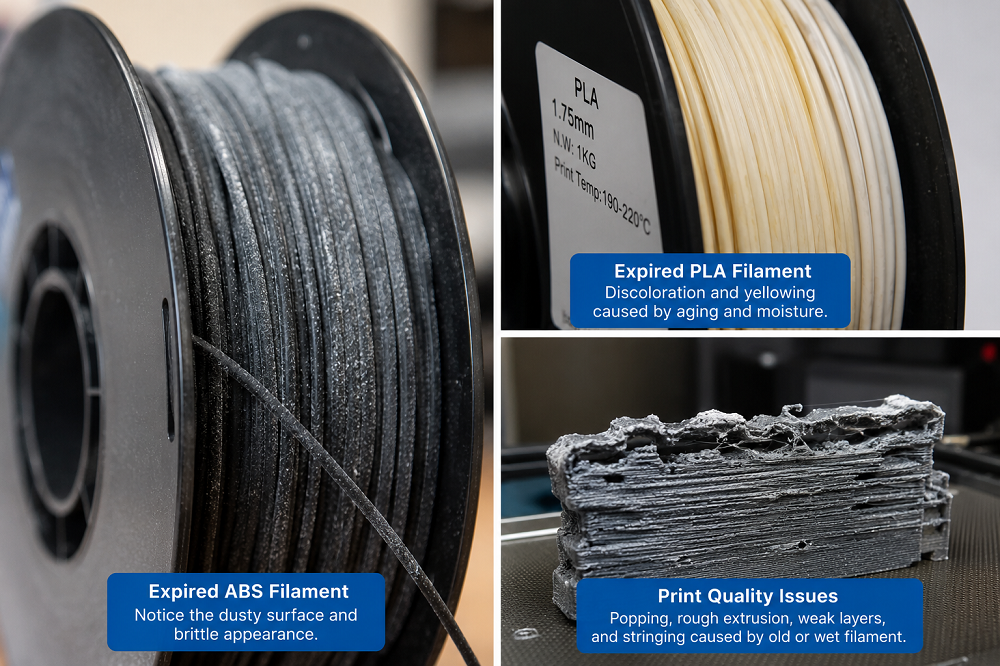
As you can see, unopened and sealed filament lasts significantly longer than opened spools. This variation is due to the moisture, sunshine, dust, and air breaking down the material. In fact, you can sometimes hear the filament popping as it begins to degrade and see the roughness in the prints.
How to Tell if Your 3D Filament Is Bad
Using filament that’s gone bad can cause a range of issues for your 3D printer, including:
-
Abrasive wear
-
Jamming and a clogged nozzle
-
Failed bed adhesion
-
Brittle/ weak prints
-
Extruder failure
-
Poor quality and surface defects
To avoid these issues, it’s important to know how to identify a bad filament. Key signs include:
Powder and Faded Colors
The surface of a cheap or old filament can look powdery, discolored, and dusty. Doing a quick examination before you start printing is a good way to determine if the filament is good or not.
Brittleness
If you suspect your filament is no longer good, you can do a quick bend test. Take a loose end from the spool and bend it tightly into a U-shape. If it flexes and bends, it’s most likely okay to use; if it snaps or shatters easily, it’s degraded.
Pocky, Rough Extrusion
A degraded or wet filament can cause stringy and weak spots, gaps, and bubbles in your prints. If you notice these issues, the filament is most likely to blame.
Sizzling and Popping
When the moisture content in your filament is too high, you may notice popping and cracking noises as it melts in the hot end. These sounds occur when the water expands and begins breaking down the fibers.
Common Causes of Degradation in Filament
While no filament lasts forever, proper storage can significantly increase its lifespan. Protecting your filament from the most common causes of degradation will help ensure it stays fresh longer.
-
Manufacturing Defects/ Low Quality - Choosing a high-quality filament is one of the best ways to protect your 3D printer and ensure your prints turn out right. Low-quality filaments can have impurities or inconsistent diameters that lead to poor performance and breakage.
-
Moisture Absorption and Humidity - The top cause of filament degradation is by far moisture. All types of filaments absorb moisture when exposed to the open air, which can cause brittleness, weak layers, and sizzling noises when heated.
-
Temperature Fluctuations - Filament requires a relatively consistent temperature that’s not too hot or cold. Frequent temperature fluctuations can cause brittleness and weaken the material.
-
Improper Storage - Another of the most common methods for filament breakdown is improper storage. Leaving your spools exposed to the open air, especially if you live in a humid environment, accelerates moisture absorption and degradation.
-
Oxidation/ Aging - Over time, all filaments will naturally break down, especially if they’re exposed to oxygen for long periods. Older manufacturing dates are another sign that the filament may no longer be good, so be sure to check the date before purchasing.
-
UV Light Exposure - UV light can wreak havoc on filament fibers. Direct sunlight breaks down the molecular structure of the plastics, causing them to become dry and brittle.
How to Fix Bad 3D Filament
The good news is that, depending on the cause of the filament breakdown, you may be able to fix it.
-
Tangled/ Knotted Spool: If your filament spool is tangled, you can manually unroll it and then re-roll it to ensure the loose end is secured. While this process can be tedious, it saves you time and money in the long run since you’re not wasting the product.
-
Brittle/ Wet Filament: If your filament has turned brittle because of moisture exposure, you can use a filament dryer or food dehydrator to remove excess water. If using a food dehydrator, follow these steps:
-
Remove the mesh trays to create a single chamber for the spool. For trays that are molded together, you may need to cut a hole in the center for the spool to fit.
-
Place the spool in the center, ensuring there is ample air flow along all sides.
-
Set the temperature for the specific material—Nylon/ABS: 140°F to 158°F; PETG: 122°F to 140°F, PLA: 104° to 113°F.
-
Set your dry time, typically 4 to 6 hours, but technical material like nylon or severely wet filament may require 12+ hours.
-
Continually check your dehydrator to ensure the temperature stays constant. You can also use a hygrometer or a separate thermometer for greater accuracy.
-
How to Prevent Filament Degradation
You can help keep your filament fresh longer by following these helpful tips.
-
Always store in an airtight container
-
Store with a desiccant like silica gel packets that absorb moisture
-
Label and rotate spools to use the older filament first
-
Store in a cool, dark, and dry place away from fluctuating and hot temperatures and direct UV light.
Get the Most Out of Your 3D Printer with Good Filament
Using good filament is the best way to protect your 3D printer and get the most out of every print. While filament can go bad, you can often successfully fix it. Proper preventive steps will increase your filament’s lifespan so you can continue creating for years to come.
Creality is proud to offer top-quality 3D printers designed for creatives. Bring your imagination to life with limitless possibilities and see what you can create. Discover our full line of 3D printers, filament, and accessories that put control in your hands!