






































You’ve just spent thirty minutes leveling your bed, and the first layer looked perfect. Confident, you step away for a coffee—only to return and find your printer tracing shapes in midair without extruding any filament. That frustrating moment is a common experience in 3D printing: filament stuck in extruder.
This case is different from a clogged nozzle because, instead of the nozzle being clogged at the tip or nozzle, the filament is unable to feed into the hotend’s heaters or the melt zone.
What Does “Filament Stuck in the Extruder” Mean?
The extruder is the mechanism responsible for gripping and pushing filament toward the hotend, where it melts and is deposited on the build plate. When filament becomes lodged in this feed path, the printer’s motors may still turn, but no material reaches the melt zone.
This case is different from a clogged nozzle because, instead of the nozzle being clogged at the tip or nozzle, the filament is unable to feed into the hotend’s heaters or the melt zone.
Symptoms of Filament Stuck in Extruder
Before it all, it’s important to confirm that the extruder is really the source of the problem. Some common symptoms include:
The “Click of Death” A rhythmic clicking or thumping from the extruder motor means it’s trying to push filament but can’t overcome resistance. The motor skips back repeatedly because of a blockage.
Filament “Sawdust” Plastic shavings near the extruder gear indicate the filament is being ground down. Over time, this prevents the gear from gripping properly.
Under-Extrusion and Gaps Thin, brittle, or sponge-like layers show the filament isn’t moving smoothly. The flow is inconsistent, causing weak spots in the print.
The Unmovable Strand If heated filament won’t budge when pulling the release lever, there’s a physical blockage. A plug or “bulb” has likely formed inside the extruder path.
| Symptom | Likely Cause | Suggested Action |
| Clicking noise from extruder | Filament grinding or slipping | Clean gear; adjust tension |
| Filament doesn’t reach hotend | Heat creep or spool snag | Improve cooling; untangle spool |
| Filament stops mid-print | Partial blockages | Heat & clear filament path |
| Flattened filament near extruder | Gear chewing filament | Replace worn gear; adjust settings |
Common Causes of Filament Stuck in the Extruder
Understanding why the jam happened is the only way to prevent it from happening again ten minutes into your next print. Most jams fall into one of these five categories:
Filament Grinding The extruder gear can grind against filament if it can’t push it forward. When the polymer solidifies in the cold region, it plugs the extruder.
Excessive Retraction Pulling filament back too far during travel can drag molten plastic into the cold zone. When it hardens there, it forms a plug that blocks extrusion.
Heat Creep If the heatsink fan is weak or the printer is too hot, heat can travel upward and soften filament before it reaches the nozzle. Softened filament can buckle and jam in the feed path.
Incorrect Extruder Tension Too loose, and the drive gear slips; too tight, and it crushes the filament. Both situations create friction that prevents smooth extrusion.
Low Printing Temperature If the filament does not get hot enough to melt completely, it will not be able to flow out of the nozzle. The unmelted core will act as a cork in this case, causing skipping or grinding on the motor.
How to Fix Filament Stuck in Extruder
If you’re currently staring at a jammed machine, follow these steps in order. We’ll start with the least invasive methods and move toward a full teardown.
Step 1: Manual Assist
-
Heat the nozzle to the filament’s upper recommended temperature (e.g., 220°C for PLA).
-
Disengage the extruder tension lever and then manually push the filament to dislodge minor blockages.
Step 2: Cold Pull (Atomic Method)
-
Heat the nozzle to printing temperature and insert a piece of filament (Nylon is best, PLA works too).
-
Once a small amount extrudes, turn off the heater and let it cool to ~90°C, then pull firmly to remove debris from inside the nozzle.
Step 3: Clear the Extruder Gears
-
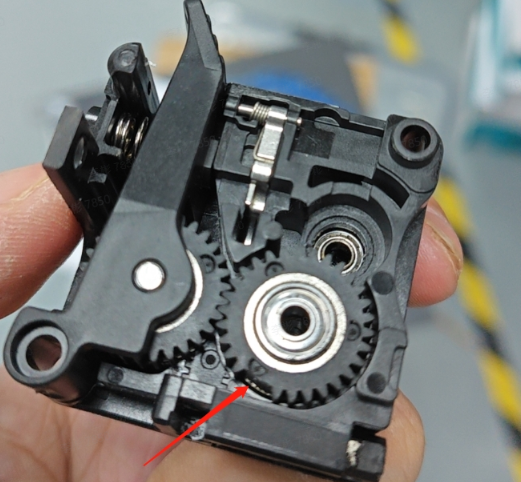
Open the extruder assembly and clean the drive gear with a brush or compressed air.
-
Remove any filament fragments caught in the gear using needle-nose pliers.
Step 4: Inspect the PTFE (Bowden) Tube
-
Remove the tube and check the end for charring or deformation.
-
Trim any damaged section square with a sharp blade and reseat it to restore smooth filament flow.
Step 5: Confirm and Test
Once the jam is cleared:
-
Reassemble the extruder and hotend.
-
Load fresh filament and perform a small extrusion test or a short calibration print to confirm smooth feeding.
How to Prevent Filament from Getting Stuck in the Extruder
Maintenance is the difference between a printer that is a tool and a printer that is a project.
-
Calibrate your retraction: Run a retraction tower test. Try to find the lowest distance that prevents stringing. More is not always better.
-
Monitor your fans: Ensure your hotend cooling fan (the one that is always on) is spinning at full speed and is free of dust.
-
Clean your gears: Every 50 hours of printing, take a second to brush the plastic bits out of your extruder drive.
-
Dry your filament: Wet filaments can cause swelling and make the filament brittle. A brittle filament easily breaks inside the extruder, and a swollen one is likely to cause friction.
When Should You Replace Parts?
Sometimes, a fix isn't enough. You should consider replacing parts if:
-
The Nozzle is Old: Brass nozzles are consumables. If you've printed several rolls of filament, the internal geometry might be worn or pitted.
-
The Extruder Arm is Plastic: Many stock printers (like the Ender 3 series) come with plastic extruder arms that develop hairline cracks. These cracks reduce tension and cause constant "fake" jams. Upgrade to a metal version.
-
PTFE Tube is Burnt: If you frequently print at temperatures above 240°C, your standard PTFE tube will degrade and release toxic fumes while becoming a sticky mess for your filament. Switch to a high-temp Capricorn tube.
Wrapping Up
A stuck filament is usually a symptom of a system out of balance—whether it's a temperature that's too low, a fan that's too weak, or a setting that's too aggressive. By systematically checking the five causes listed above, you can turn a frustrating afternoon into a quick five-minute fix.