Welcome to Creality  12th Anniversary 🔥

Creality
Store
  • 3D Printers
  • Ecosystem
  • Support
  • Software
  • Blog
  • Creality Cloud
  • Investor Relations
  • United States (English)
Cancel

Quick Links

    Creality
    3D PrintersEcosystem SupportSoftwareBlogCreality CloudInvestor Relations
    Store
    SPARKXFlagshipHi SeriesEnder SeriesHALOT Series
    SPARKX i7
    New
    SPARKX i7
    More Products
    Compare
    K2 SE
    New
    K2 SE
    K2
    New
    K2
    K2 Pro
    K2 Pro
    K2 Plus
    K2 Plus
    K1 Max
    K1 Max
    More Products
    Compare
    Creality Hi
    Creality Hi
    More Products
    Compare
    Ender-3 V4
    New
    Ender-3 V4
    Ender-5 Max
    Ender-5 Max
    Ender-3 V3 Plus
    Ender-3 V3 Plus
    Ender-3 V3
    Ender-3 V3
    Ender-3 V3 SE
    Ender-3 V3 SE
    More Products
    Compare
    HALOT-X1
    New
    HALOT-X1
    HALOT R6
    HALOT R6
    HALOT-MAGE S
    HALOT-MAGE S
    HALOT-MAGE
    HALOT-MAGE
    More Products
    Compare
    Filaments3D ScannersLaser EngraversAccessories
    Hyper Series
    Hyper Series
    CR Series
    CR Series
    Soleyin Series
    Soleyin Series
    Ender Series
    Ender Series
    More Products
    Compare
    Sermoon P1
    New
    Sermoon P1
    Sermoon X1
    Sermoon X1
    Sermoon S1
    Sermoon S1
    Creality Raptor Pro
    Creality Raptor Pro
    Otter Lite/Basic
    Otter Lite/Basic
    More Products
    Compare
    Creality Falcon T1
    New
    Creality Falcon T1
    Creality Falcon A1 Pro 20W
    New
    Creality Falcon A1 Pro 20W
    Creality Falcon A1
    Creality Falcon A1
    Creality Falcon2 Pro 60W
    Creality Falcon2 Pro 60W
    Creality Falcon2 Pro
    Creality Falcon2 Pro
    More Products
    Compare
    CFS-C
    New
    CFS-C
    SpacePi X4L
    New
    SpacePi X4L
    Creality SpacePi X4
    Creality SpacePi X4
    Creality Space Pi  Dryer
    Creality Space Pi Dryer
    CFS - Creality Filament System
    CFS - Creality Filament System
    More Products
    Compare
    Download Center
    3D Models
    Creality Cloud App
    Firmware & Software
    Service Center
    Help Center
    Creality Wiki
    Product Support
    Video Guides
    Product Comparison
    Filament Guide
    Find Your Printer
    Discover
    User Stories
    3D Scanner Applications
    3D Printing in Education
    Blog Center / K2 / K2 Pro PTFE Tube Replacement Steps & Tools Required
    Contents
    contents

    Join Our Newsletter

    Subscribe to our newsletter for 3D printing insights, step-by-step guides, and inspirations for your next 3D printing adventure.

    By subscribing, you agree to our Terms and Privacy Policy.

    Social Media

    • Youtube
    • Facebook
    • Instagram
    • TikTok
    • Twitter
    • Reddit
    • Discord
    • LinkedIn

    Contents

    • Tools
    • Replacement Steps
    • Friendly reminder

    K2 / K2 Pro PTFE Tube Replacement Steps & Tools Required

    Jun 5, 2026 17:38:31

    Tools

    New PTFE tube

    Replacement Steps

    Note: This tutorial is for reference only. Please refer to the actual product.

    Disassembly

    Remove the short PTFE tube.

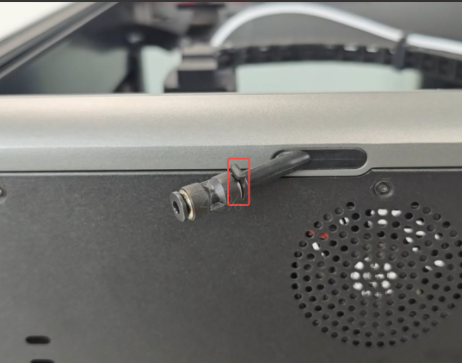
    At the back of the machine, press the two-way tube connector and pull out the PTFE tube.
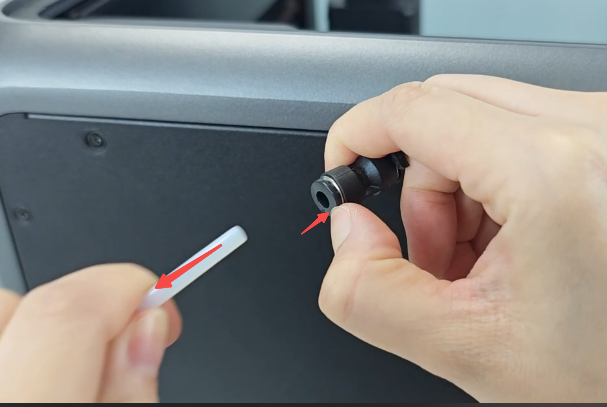
    Remove the short PTFE tube
    pull out the PTFE tube (2)

    Remove the long PTFE tube.

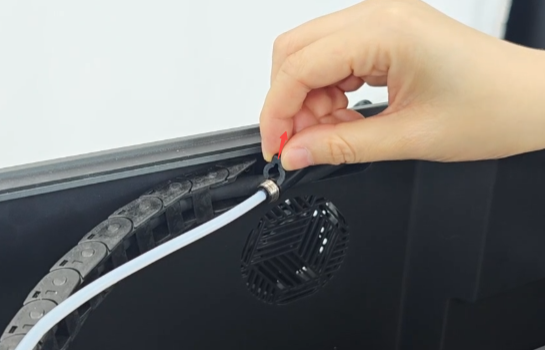
    Pull out the buckle, press the two-way tube connector, and pull out the PTFE tube.

    Remove the long PTFE tube
    pull out the PTFE tube

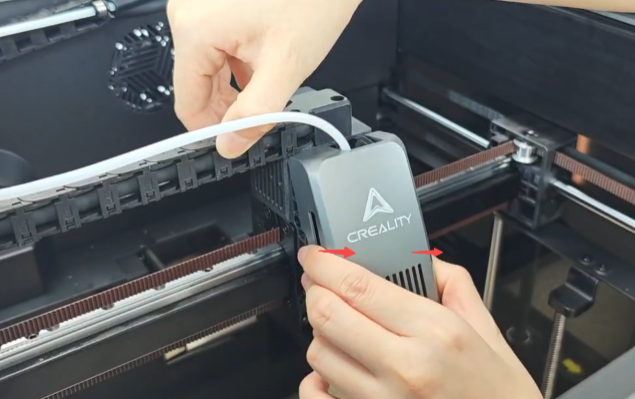
    Remove the front cover of the nozzle.

    pull out the PTFE tube

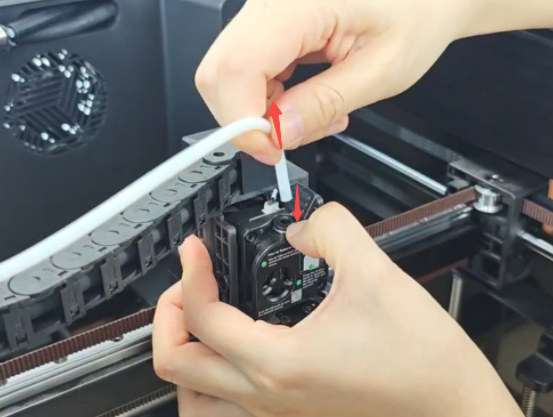
    Press the tube connector and pull out the PTFE tube.
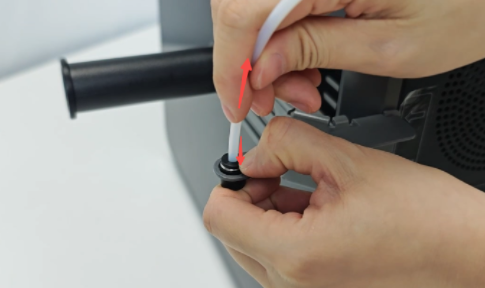
    Press the tube connector and pull out the PTFE tube

    Pull out the buckle.

    Pull out the buckle

    Pull out the PTFE tube.

    Pull out the PTFE tube

    Pull out the tube connector.

    Pull out the tube connector

    Remove the PTFE tube.

    Remove the PTFE tube

    Installation

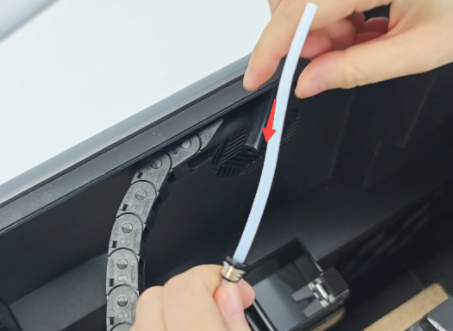
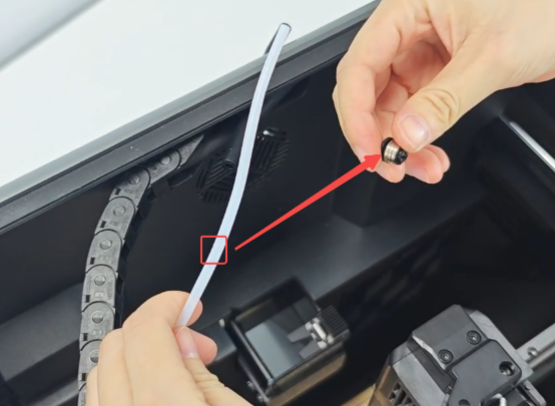
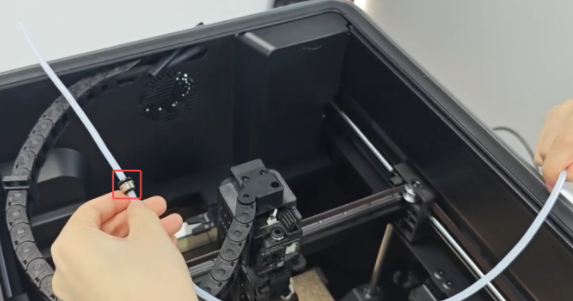
    Thread the PTFE tube through the tube connector, insert the PTFE tube about 3/4 of the way.
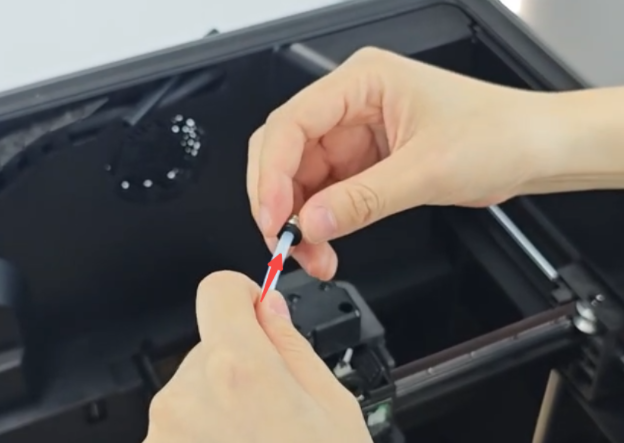
    Thread the PTFE tube through the tube connector
    insert the PTFE tube

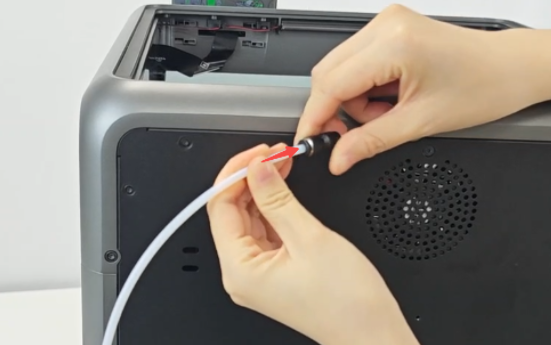
    Thread the short end through the rubber tube.
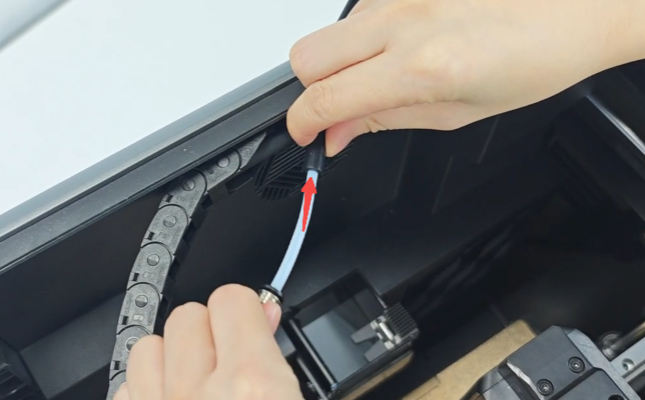
    Thread the short end through the rubber tube.
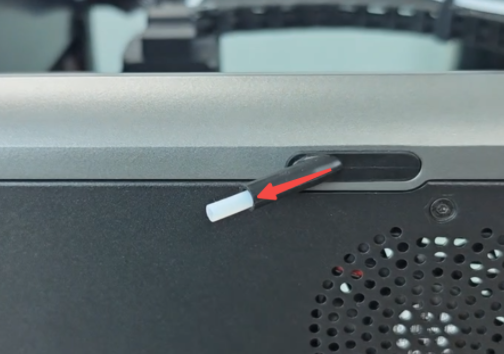
    Thread the short end through the rubber tube

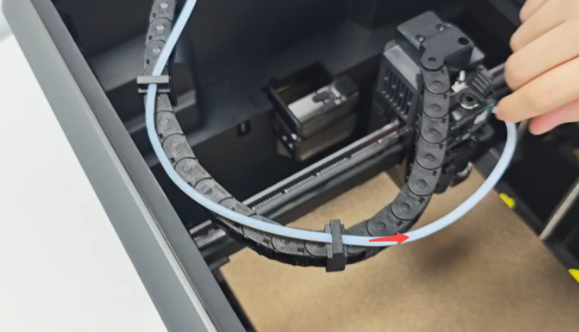
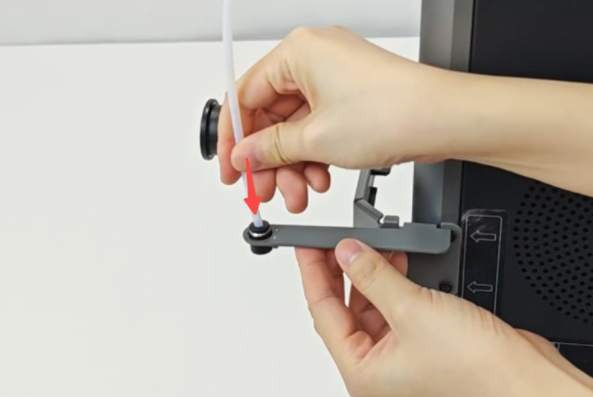
    Thread the PTFE tube through the fixing clip.
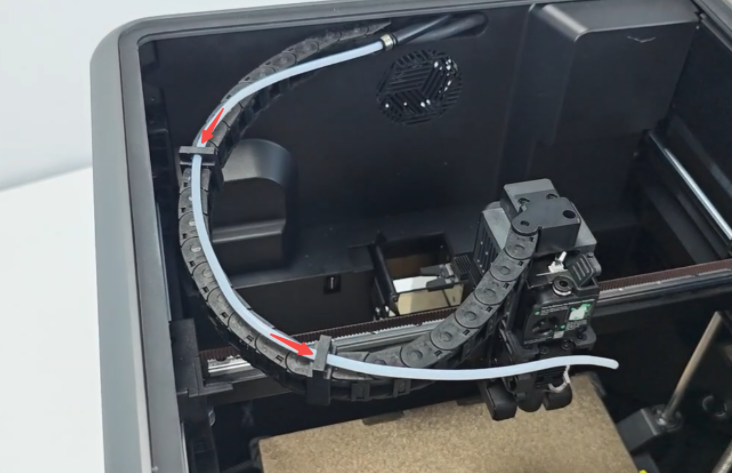
    Thread the PTFE tube through the fixing clip

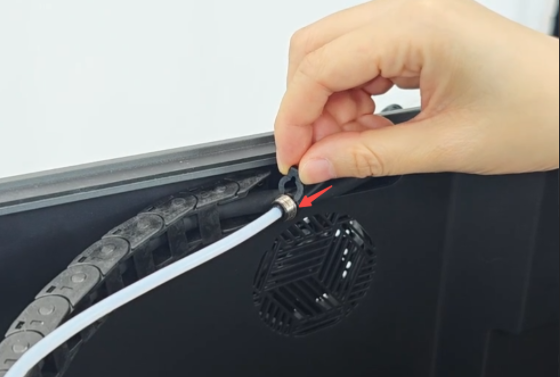
    Insert the PTFE tube into the tube connector.
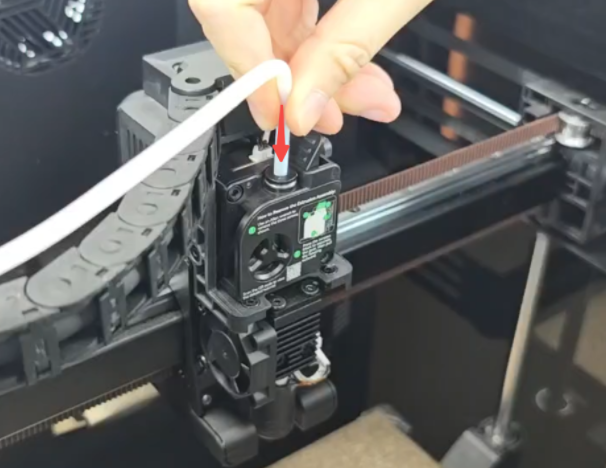
    Insert the PTFE tube into the tube connector

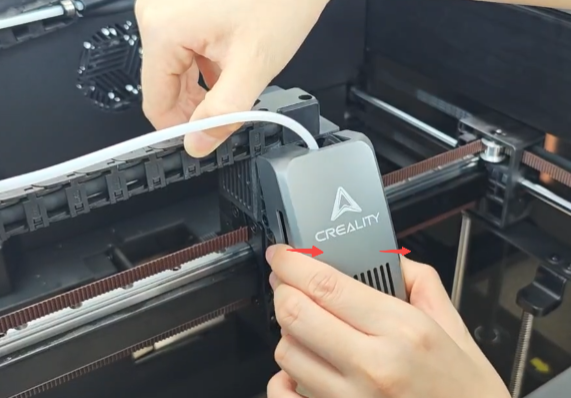
    Install the front cover of the nozzle
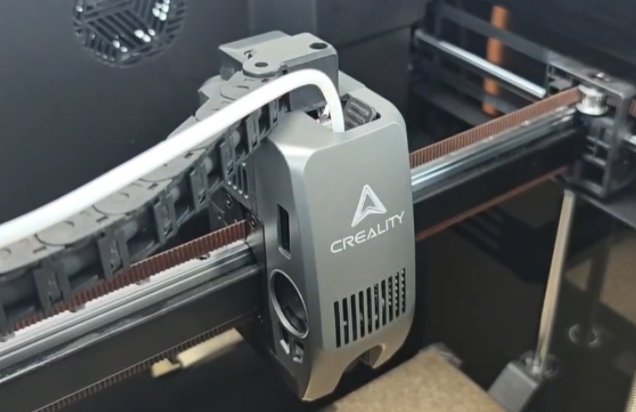
    Install the front cover of the nozzle

    Insert the two-way tube connector.
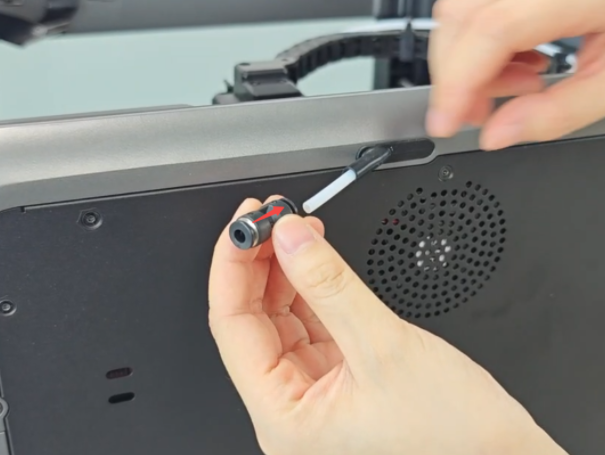
    Insert the two-way tube connector

    Insert the short PTFE tube.

    Insert the short PTFE tube
    Insert the short PTFE tube

    Insert the buckle on the right side of the two-way tube connector.
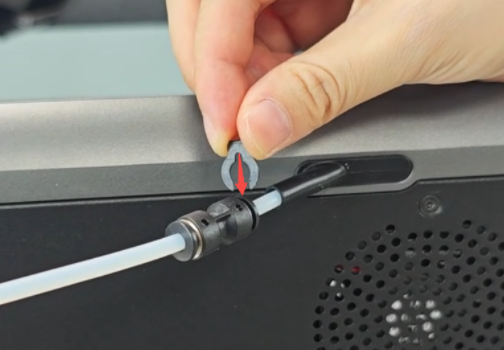
    Insert the buckle on the right side

    Adjust the position of the PTFE tube and tube connector to ensure better contact between the tube connectors and rubber tube at both ends.
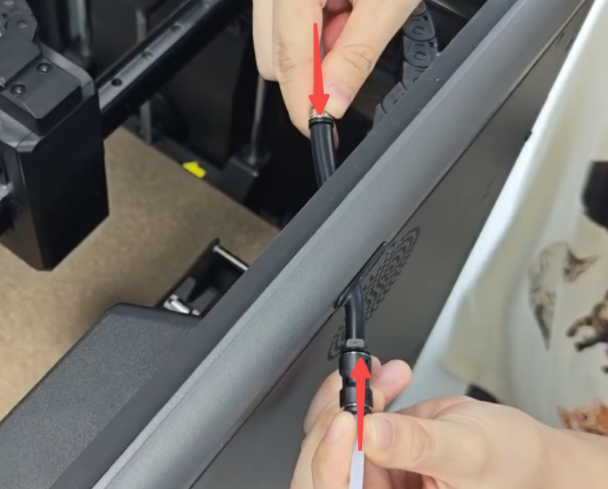
    Adjust the position of the PTFE tube

    Insert the buckle.

    Insert the buckle

    Friendly reminder

    If you still haven't resolved the issue after following the steps in this document, or if you encounter any difficulties during the process, you can click the right corner of the wiki page online support to contact our after-sales team for more help.

    SHOP

    • Store
    • Falcon Store
    • Where to Buy
    • K Series
    • Hi Series
    • Ender Series

    COMMUNITY

    • Forum
    • Creality Cloud
    • Discord
    • Reddit
    • Open Source

    SUPPORT

    • Downloads
    • Help Center
    • Video Guides
    • Warranty & Repairs
    • Creality Wiki

    ABOUT

    • Contact Us
    • Distributors
    • ShareFest Events
    • Investor Relations

    Be the First to Know

    Get the latest news from Creality.

    • Youtube
    • Facebook
    • Instagram
    • TikTok
    • Twitter
    • Reddit
    • Discord
    • LinkedIn
    Privacy PolicyTerms of SalesShipping PolicyFeedback
    United States(English)

    Copyright © 2026 Creality Co., Ltd. All rights reserved.