


Creality is releasing a versatile 3D printing APP Creality Cloud to help 3D printer users to achieve remote 3D printing. Now, the APP is available for users to download in Google Play Store and Apple Store.
Mark Cheng, the project manager of Creality Cloud, said “Creality Cloud is going to be the most versatile 3D printing APP in the marketing. When matched with a self-developed Wi-Fi box by Creality, Creality Cloud will support the online printing/online slicing/online model library. In addition, Creality Cloud also has an interactive social function which will enable users to directly reach other professional designers/makers, Creality engineers, and even real-time online customer service from Creality.”
Download and Register Creality Cloud in Google Play Store or Apple Store now!
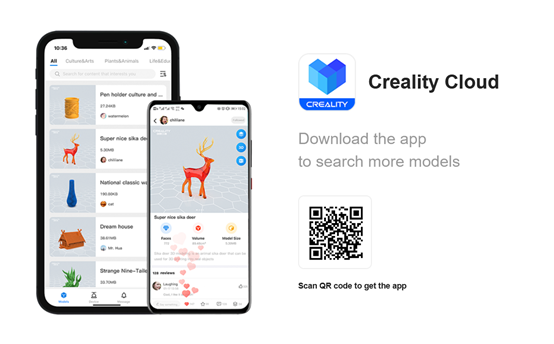
Online Model Library on Creality Cloud
Model Library is going to be the most thriving part of Creality Cloud. The online model library enables users to discover, make, and share all kinds of 3D printable models.
Especially for those who get started exploring 3D printing fun, the online model library on Creality Cloud will provide numerous 3D printable models in various categories.
For those who are professionals in the 3D printing field, the online mode library on Creality Cloud will be the most easy-to-use database for storing your self-designed 3D models. Your shared 3D models will also be the funniest thing for other 3D printing users to explore.
How to Upload Your 3D Models to Creality Cloud
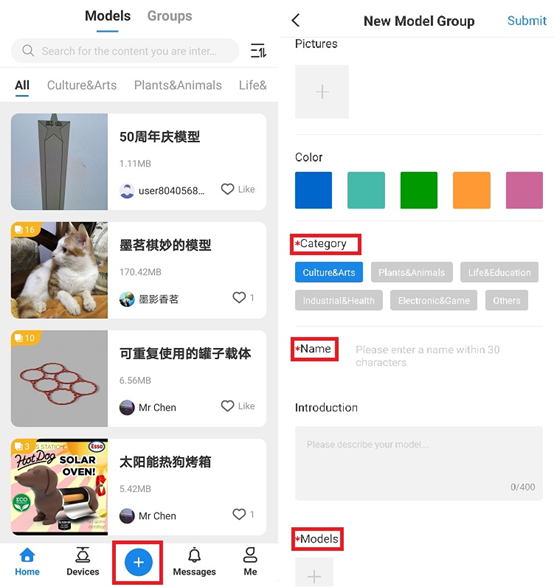
1. Click the “+” button at the bottom interface of Creality Cloud, and then you will enter the model upload page.
2. Follow the steps shown on the model upload page to finish upload your model. Note: The terms with “*” are required information. Without filling them out, your model cannot be uploaded successfully.
Online Slicing on Creality Cloud
Online Slicing is going to be the most user-friendly part of Creality Cloud. Online slicing enables users to finish slicing their 3D model on this versatile mobile phone APP, with the simplest slicing settings.
With Creality Cloud, slicer software and advanced slicing skills are no longer so much required. Everything before 3d printing just becomes easy!
By far, Creality Cloud supports slicing 3D models for all Creality FDM 3D printers. The model slicing function for resin 3D printers is still under development. In the future, Creality Cloud will be upgraded to support slicing for a 3D printer of any other brands.
How to Slice Your 3D Model on Creality Cloud
1. Choose a 3D model from the online model library.
Click the button shown in Pic1 to check whether there is a G-code for your chosen model.
*If there is a G-code file available, you can check whether the G-code can be used on your printer. If not, please slice the model by yourself.
*If there is no G-code file available, you need to slice the model by yourself.
Let’s follow the steps below to finish slicing!
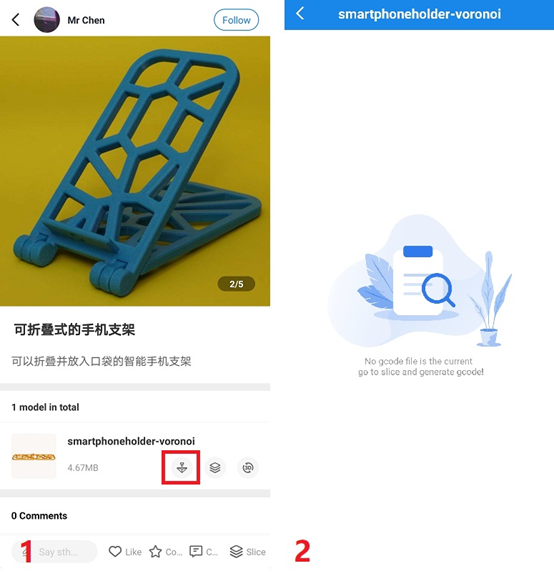
2. Click the “Slice” button to enter the slice interface on Creality Cloud.
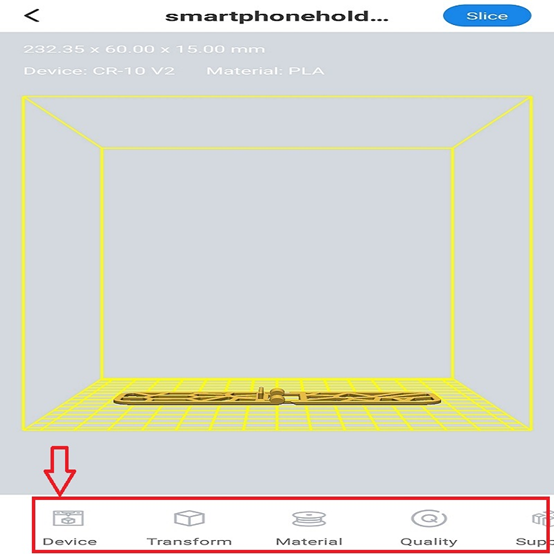
On the model slicing interface, users are able to adjust specific settings.
The “Device” part is for selecting the model of your 3D printer; the “Transform” part allows to adjusting the scale/rotation of 3D model; the “Material” part is providing two filament choices now, the PLA and the ABS; the “Quality” part enables users to define the print quality of the 3D model at “Industrial” level, “Normal” level, or “High” level; the “Support” part makes it possible to automatically add supports for 3D model.
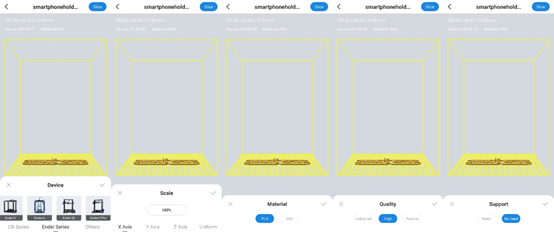
With all the settings done on the Creality Cloud APP, users just need to click “Slice” on the upper right corner of the interface and save it in G-code file. The whole slicing process only takes 1-3 minutes.
Remote Printing on Creality Cloud
Using the Creality Cloud APP, users can remotely start the printing on Creality 3D printers when matched with the Creality Wi-Fi box.
With the G-code file generated on Creality Cloud, users can just need to choose the G-code file to print on Creality 3D printers.
With Creality Cloud, you can now manage your 3D printers while you're in the bathroom! Or anywhere else...
Get Socially Connected on Creality Cloud
Except for the functional features, Creality cloud is a mobile APP supporting social networking.
On Creality Cloud, users can join a Creality 3D printing community: You can reach professional engineers and 3D designers on Creality Cloud, and register and participate in online and offline activities host by Creality.
Besides that, users can directly get technical support from Creality which covers Creality 3D printer tutorial videos, after-sales maintenance and troubleshooting on Creality Cloud database or from our engineer via Creality Cloud.
Creality Wi-Fi Box Giveaway Campaign
Campaign time: August 10th to August 25th.
How to enter:
1. Download and register on the APP
*If you are an Android user, please download “Creality Cloud” in Google Play Store.
*If you are an iOS user, please download “Creality 3D” in Apple Store.
2. Publish a post about “How You Want Creality Cloud to Be Optimized” in the “Activity” zone. More detailed optimization advice will be welcomed and appreciated. Download this app and post your advice to Creality Cloud in the Activity group.
3. 100 Giveaway winners will be those who have the top “likes” on their posts. You can invite your friends to click “like” on your post. The more likes you have, the higher the chance of winning a Creality Wi-Fi box.
On August 26th, we will announce the Giveaway winners for the Creality Wi-Fi box. Giveaway gift shipment and delivery will finish in 10 days when the campaign ends.