


In most cases, there are many filaments was left on the 3D model after printing that be called as 3D printing stringing.
This is caused by the filaments hanging down from the nozzle as it moves to a new position.
The best way to solve the stringing problem is retraction.
Starting the retraction, the area of extruder finishes printing the model, the filaments in the nozzle are pulled back, and when printing again, the filaments are pushed back into the nozzle and extruded from the top of the nozzle.
If you would like to confirm that the retraction is on or not, you can check it in the machine settings, Next, we can improve this situation by adjusting the parameters.
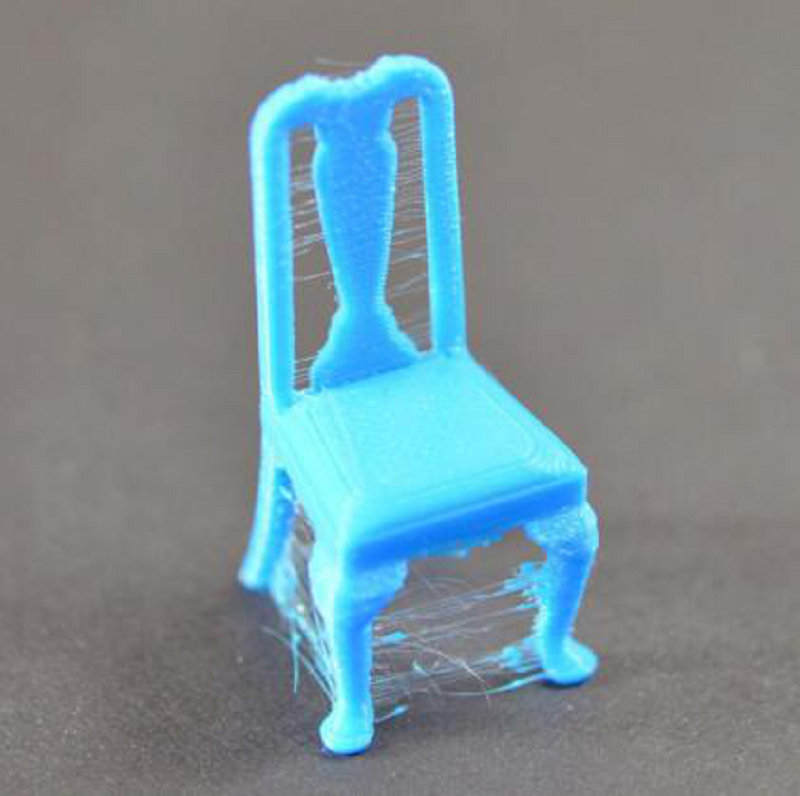
(Stringing or hanging)
The most important setting is the retraction distance for retraction, It determines how many filaments will be pulled back from the nozzle.
Generally, the more filaments are pulled back from the nozzle, the less likely the nozzle will be hanging when it moves. The normal pull-back length is set at 6mm-10mm, depending on the characteristics of the filaments as well.
The retraction speed is another related setting
It determines how fast or slow the filaments will be withdrawn from the nozzle. If the pullback is too slow, the filaments s will hang down from the nozzle and thus start to flow out before moving to a new position.
If the retraction is too fast
The filaments may be disconnected from the filaments in the nozzle, or even the fast rotation of the drive gear may shave off the surface part of the filaments.
The value between 3600mm to 6000mm/min(60-100mm/s) is an ideal range, it's worth noting that the actual operation needs to be determined according to the material you use, so this appropriate speed needs to be confirmed by constantly doing tests.
The temperature is too high
If you have checked the retraction speed, the next common factor that causes pulling problems is the extruder temperature. The normal PLA printing temperature is 190°C-210°C. If the temperature is set too high, the filaments in the nozzle will become very sticky and in turn flow out of the nozzle more easily.
If the temperature setting is too low, the filaments will remain stiffer and harder to extrude from the nozzle. If you feel that the pumping back speed setting is fine, but you still experience pulling, try lowering the extruder temperature by 5°C - 10°C, which may have a noticeable effect on the final print quality.
The moving distance is too long
In addition to the above factors, there is another reason that can lead to the occurrence of pulling, and that is moving too long a distance.
Short-distance movement is fast enough that filaments don't have time to flow out of the nozzle, but long-distance movement may lead to pulling.
There is no way to improve this in Cura by setting parameters, but only through a combination of the above factors to adjust to try to avoid this situation.