


JAMES BRUCE
3D printers aren’t the most user-friendly or safe at the best of times. They’re mechanical devices with no safety stops and a 200C hot metal tip jerking around, and they can cause serious injury to little fingers if left unattended.
The Sermoon V1 Pro from Creality is a fully-encosed design with acrylic windows, auto pause when the door is opened, and even a webcam to check on your prints remotely from a smartphone app. Is it the beginner-friendly 3D printer you’ve been waiting for? Maybe.
Set Up and Hardware Impressions
The Sermoon V1 Pro arrives well packaged and there’s very little construction to do; just cut the cable ties that hold the internals all together. The most tedious step is then peeling the protective plastic off the acrylic that encloses three sides of the printer. Also, there's a blob of foam protecting the Z-axis inside which must be removed, but it's not obvious.
Except for the filament spool that sits on a fold out arm to the side, the Sermoon V1 Pro is fully enclosed within a grey, white, and clear acrylic case measuring 40 x 38 x 43cm. It's about as big as a laser printer, and will easily fit on a desktop or shelving unit. The downside to being this compact is the build volume suffers, with a total printable area of just 175mm square on the X/Y, and 165mm tall.
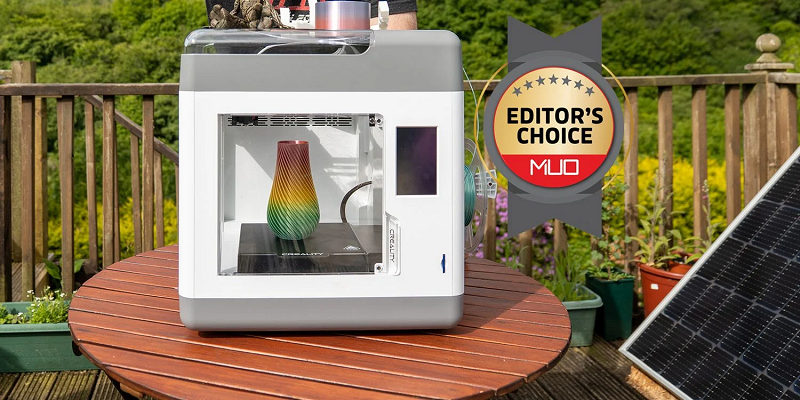
The fully-enclosed design is not only much safer, it also helps to reduce noise levels and produce more reliable prints.
If the door on the front of the printer is opened, the print will pause—but the hotend remains hot. So while it can still pose a danger, the risk is minimimzed as it won't be jerkily moving the hot end around.
While not exactly silent, I can comfortable work in the same room without the noise proving to be too loud. You won't need to hide it away in a workshop.
Magnetic Print Bed, Wi-Fi, and Webcam
The Sermoon V1 Pro features a heated print bed with magnetic PEI-coated steel sheet to improve adhesion. It's easiest to remove and snap off your print once cooled, and so far I've had no issues with adhesion, so clearly it works.
You'll find Wi-Fi connectivity, so you can print from your the Creality Cloud smartphone app or website, and specifically on the Pro model, there's also a built-in webcam. This allows you to remotely view your current print from the smartphone app. Internal lighting is automatically activated when viewing the camera feed, though you can also control it at any point from the touchscreen on the printer.
While viewing the built-in camera feed directly worked great—even when outside of my home—I found the previous recordings couldn't be viewed. Supposedly, every print is automatically recorded and saved to the SD card, with older recordings overwritten when full (like a dashcam).
Sprite Extruder
The Sermoon V1 Pro uses Creality's own "Sprite" design of direct-drive dual-gear extruder, whihc feeds in filament more reliably, with less slipping. However, it also features a Bowden tube, through which the filament is fed from the external spool holder and a small hole. It's an interesting hybrid design that ensures no snags on the top mechanisms, while still provinding the benefits of a direct-drive extruder system.
The extruder can be heated to 250C, making it suitable for other filament such as ABS or PETG, though since this designed for beginners, I only tested with PLA. Feeding and retracting the filament is done using a single button in the interface, where it heats to 240C then automatically retracts or pulls a little. The rest of the operation is done by hand, manually pushing or pulling the filament through the tube from the side of the machine.
In my testing so far, it's worked well, with smooth filament feeding, and changing.
What's the print quality? Let's take a look.
Creality Sermoon V1 Pro: The Perfect Beginner Device?
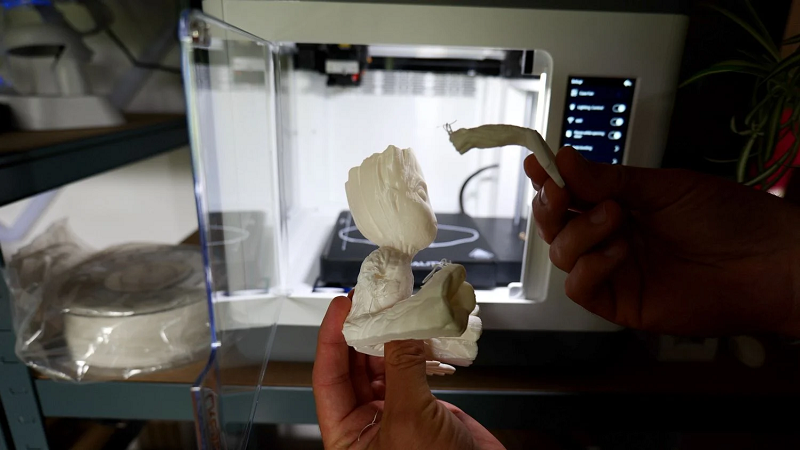
The print quality that you get right out of the box is great. It's by no means perfect, but it does give you a solid foundation upon which to improve as you learn. A lot of beginners can stumble at the first print, then be left frustrated and confused as to whether they're at fault, or the hardware. 3D printing is an epic learning journey, and a reliable printer like the Sermoon V1 Pro will be of immense help.
There are definitely areas that Creality could improve upon. The smartphone app is cluttered with annoying features and notifications you'll want to disable immediately. The fact that you can grab a model, slice it, and print, all from within the app, is incredible though—and well above anything offered by competitors at this price point. It just needs a little streamlining.
Experienced users will likely be frustrated with the lack of autoleveling and small print volume, as well as the simplified touchscreen UI. They're also more likely to use a desktop slicer, which requires the intermediate step of uploading to the cloud if you want to use the wireless printing feature.
So while not quite a perfect beginner printer, the Sermoon V1 Pro nevertheless sets the bar very high for anyone claiming a beginner-friendly printer in the future. It's a great quality, safe, and neat desktop printer that'll serve you well for any small-scale printing needs.
Source By: https://www.makeuseof.com/creality-sermoon-v1-pro-3d-printer-review-beginners/