









































When you look closely at your 3D print and see faint ripples or echo-like waves trailing behind corners or text, you’re seeing what’s known as 3D printing ringing or ghosting. It’s one of the most common print quality issues—and also one of the most frustrating.
In this guide, we'll break down what 3D printer ghosting is, why it happens, how to fix it, and how to prevent it from occurring in the future. Whether you're a hobbyist or are professional, these will be helpful tips to achieve smoother and cleaner prints.
What Is 3D Printer Ringing or Ghosting?
3D printer ringing, also known as ghosting or rippling, is a phenomenon of those fine, repeated patterns or faint echoes that show on the surface of your 3D prints, typically on the X or Y axis.
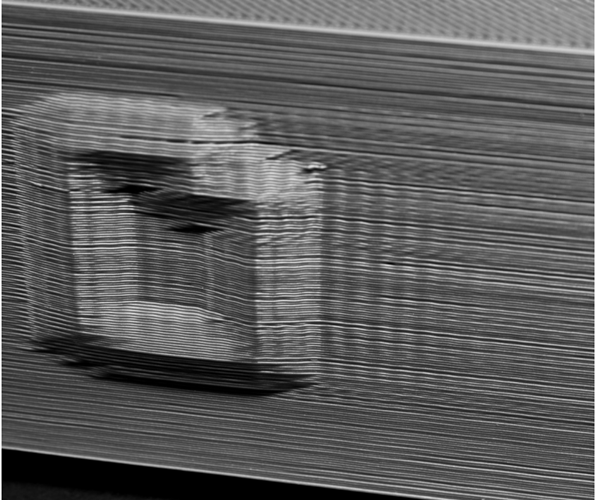
They result from tiny mechanical vibrations that take place when the printhead makes sudden turns. The vibration causes the nozzle to oscillate in a tiny way, producing repeated outlines—or "echoes"—of that edge or corner.
That's the reason why other people call it a ghosting print problem—since it looks like a shadow of your initial print form.
What Causes 3D Printer Vibration and Ringing?
In truth, 3D printer vibration and ringing trace their causes back to mechanical instabilities and rapid movement which the printer cannot travel through smoothly.
When the printhead is accelerating or decelerating, especially at high velocities, it gains inertia, causing parts to vibrate or swing. This energy is transmitted to the printing surface as waves.
High Speed, Acceleration, or Jerk Settings
If your printer moves too fast (above 60-80 mm/s for many models) or changes direction too abruptly, it creates strong inertial forces. These forces make the frame and toolhead vibrate, and the vibration continues even after the direction changes.
While high speeds can shorten print times, they often come at the cost of visible ringing.
Loose Belts or Pulleys
Loosely fitted belts will wag or bounce slightly as the printhead moves, causing oscillations to manifest in ghosting lines.
On the other hand, over-tight belts will stress bearings or motors, leading to resonance.
Frame Instability
A wobbly or lightweight print frame lets vibrations travel throughout the machine. If your printer is on a flimsy table or wobbly stand, even slight movements will enhance ghosting.
Heavy Print Head or Moving Bed
The heavier your bed or printhead, the more mass it has. When it makes a turn, that mass continues to move for a fraction of a second and produces a vibration that propagates to your print.
This is mostly common in direct-drive extruder printers or giant moving beds (e.g., on Cartesian printers).
Stepper Motor Resonance
Stepper motors themselves produce tiny vibrations when rotating. If the vibration of this corresponds with the natural frequency of the frame, resonance is developed, and ringing and ghosting are increased. It is the same as when a speaker makes a table resonate at certain notes.
How to Fix Ghosting and Ringing in 3D Prints
Fixing 3D printer ghosting does not require a complete makeover—start simple and iterate. You don't require new hardware—just some smart motion parameter tweaks and mechanical tweaks.
Lower Speed, Acceleration, and Jerk
This is the easiest and most effective fix.
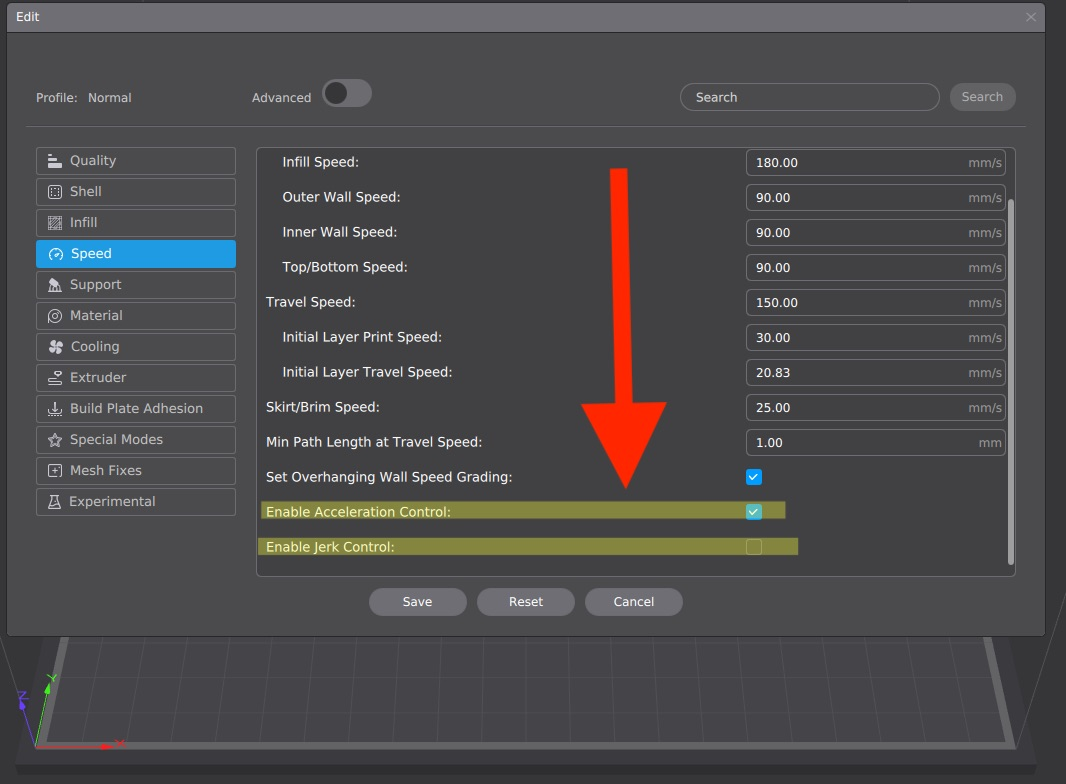
-
The quickest win is to slow down your print speed to 40-60 mm/s in your slicer (e.g., Creality Print) and test.
-
Reduce acceleration to about 500-1000 mm/s².
-
Keep jerk (instant speed change) low as 5-10 mm/s to prevent sudden direction shifts.
The print will take slightly longer, but you’ll get smoother surfaces and sharper corners.
Tighten Belts and Check Frame Stability
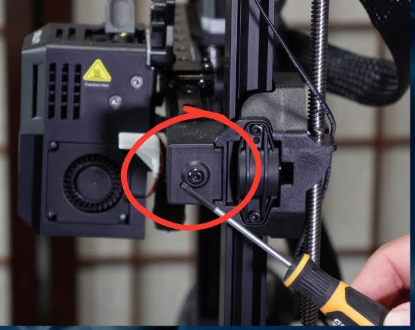
Inspect your printer regularly. Loose screws, wobbly rods, or uneven belts can all create vibration.
-
Check both X and Y belts for consistent tension.
-
Tighten frame bolts gently but firmly.
-
Make sure pulleys are aligned and locked to motor shafts.
These simple checks often make a visible difference in surface finish.
Strengthen the Printer’s Base
Your printer's base is just as critical as its firmware.
-
Place it on a solid, heavy table or platform.
-
Add vibration-damping pads or rubber feet to absorb motion.
-
Avoid placing the printer near fans, washing machines, or speakers that can introduce extra vibration.
The more solid and smooth the base, the smoother your prints will be.
Reduce Print Head Weight
Every gram matters when it comes to motion control.
-
Choose lightweight hotends or fans.
-
Secure wiring to prevent cable drag.
-
If you use a direct-drive extruder, make sure the mount is rigid and not flexing during travel moves.
Less mass means less inertia, which means fewer ripples on your model.
Keep Everything Smooth and Lubricated
Friction is also responsible for minimal vibrations. Lubricate and clean your lead screws, bearings, and rods of your printer every now and then. Free motion and even extrusion are facilitated by this.
How to Prevent Ghosting Printing Problems in the Future
Prevention beats cure, especially for the ghosting printing problem. Build habits to keep vibrations at bay:
-
Regular Maintenance: Every 20-30 print hours, inspect and tighten belts, screws, and pulleys. Lubricate rods and bearings for smooth motion. Clean the nozzle and fans to avoid clogs that indirectly cause issues.
-
Moderate Settings from the Start: Stick to balanced speeds (40-60 mm/s) and conservative acceleration/jerk. Update your slicer and firmware regularly for bug fixes and new features like input shaping.
-
Invest in Quality Setup: Use a sturdy printer frame and quality components like steel-core belts or low-vibration motors. Place your printer on a dedicated, stable stand with dampers.
-
Design Considerations: In your models, add chamfers or rounded edges to minimize sharp turns. Print in orientations that reduce axis stress.
-
Monitor and Test: Run periodic calibration prints and use apps or lasers to check vibrations. Dry filament properly, as moisture can worsen flow issues.
Proactive measures will take you more time fixing and less time printing. It's just all about the smooth, vibration-free process.
FAQs
Q: Can 3D printer vibration compensation fix ghosting and ringing?
A: Yes, vibration compensation (also called input shaping) can help reduce ghosting and ringing by electronically counteracting the printer’s mechanical vibrations. It’s supported in firmware like Klipper and some Marlin versions.
However, it’s not a complete substitute for good mechanical tuning—proper belt tension, frame stability, and optimal speed/acceleration settings are still essential for the best print quality.
Q: Do I need expensive upgrades to prevent ghosting?
A: Not at all—basic maintenance and settings adjustments often suffice. Upgrades like dampers are helpful but optional for severe cases.
Q: Can filament type affect ringing?
A: Yes, softer filaments like TPU vibrate more easily. Stick to rigid ones like PLA for starters, and adjust settings accordingly.
Q: What's the difference between ghosting and layer shifting?
A: Ghosting is surface ripples from vibrations; layer shifting is major offsets from mechanical failures like skipped steps.
Final Thoughts
Ringing and ghosting are two of the most common 3D printing flaws, but they're also two of the easiest to fix if you understand why they're happening. It's all about vibration—when your printer vibrates, your prints echo.